# Proa documentation corpus
This plain text endpoint concatenates the Markdown source used to build the Proa site.
---
# Docs: Quickstart
URL: /docs
Description: Create a Proa site, run it, and edit your first route in five minutes.
---
title: Quickstart
description: Create a Proa site, run it, and edit your first route in five minutes.
sidebar_title: Quickstart
---
This quickstart gets you from an empty directory to a hello world Proa. It should take about five minutes once Rust, GitHub access to the Proa repository, and the Proa CLI are ready.
Building with an AI agent? The complete documentation is served at [/llms-full.txt](/llms-full.txt) for agent consumption. [LLM docs](/docs/llms) lists the other machine-readable interfaces.
## 1. Install Proa
Install the CLI with the one-line installer.
```bash
curl -fsSL https://proa.so/install.sh | sh
```
```powershell
irm https://proa.so/install.ps1 | iex
```
The current prebuilt binary targets 64-bit Ubuntu 24.04+. On macOS, Windows,
ARM Linux, and older Linux releases, the installer builds the CLI from source
automatically; while the source repository is private, that fallback requires
GitHub access to it.
```bash
CARGO_NET_GIT_FETCH_WITH_CLI=true \
cargo install --git https://github.com/proa-labs/proa --locked proa-cli
```
The prefix matters: Proa crates are git dependencies, and the git CLI fetch
picks up credential helpers and proxy settings that Cargo's built-in fetcher
does not. [Troubleshooting](/docs/guides/troubleshooting) has the
details.
Set `PROA_CLI_VERSION` to a version that is already published on the stable
channel, then pass it to the installer:
```bash
curl -fsSL https://proa.so/install.sh | PROA_VERSION="$PROA_CLI_VERSION" sh
```
## 2. Create A Site
The kitchen-sink starter, and the fastest way to see a production Proa app
fit together:
```bash
proa new site origin-atlas --template origin --yes
```
This scaffolds ORIGIN, a live routing atlas that exercises the whole
framework: a custom RIPEstat `DataLoader` with request-scoped deduplication
and a TTL cache, streamed Suspense sections, proa-ui components that each
carry a Markdown representation (the same page serves `/site/.md` for
agents), rsjs islands for the interactive surfaces, Tailwind styling with a
themed token set, self-hosted fonts, and a golden test that pins the
server-rendered document byte for byte. The generated `README.md` doubles as
an editing guide.
Checkpoint: `src/lib.rs`, `src/loader.rs`, and `src/components/` should
exist, and `proa dev --open` shows the atlas.
A minimal Axum-backed application with the core boundaries in place:
```bash
proa new site hello-proa --yes
```
```proa-filetree
Cargo.toml
proa.config.json
proa.lock.json
build.rs
src/
components/
endpoints/
layouts/
pages/
app.rs
main.rs
routes.rs
migrations/
public/
favicon.svg
styles.css
styles/
input.css
tests/
```
Checkpoint: `Cargo.toml`, `src/main.rs`, `src/pages/home.rs`, and
`src/layouts/root.rs` should exist.
You do not have to build the common UI yourself: [proa-ui](https://ui.proa.so) is a shadcn-style catalog of ready-made Proa components, and `proa ui add button` vendors the source into `src/components/` where you own and edit it like any other file. Worth knowing before you write your first card, dialog, or form by hand.
## 3. Run The Server
```bash
cd hello-proa && proa dev --open
```
`proa dev` builds configured assets, runs the linked RSJS pipeline, starts the
Axum server on [http://localhost:3000](http://localhost:3000), and restarts
when Rust, style, or config files change.
Open tabs reload themselves once the rebuilt server is accepting connections
again, so you do not have to refresh by hand. Stylesheet edits are applied
without navigating, which keeps scroll position and form state. Turn it off or
retune it with `--no-reload`, `--no-css-hot-swap`, and `--debounce-ms`; see
[Live reload](/docs/cli/new-site#live-reload).
## 4. Edit The First Page
Set up [your editor](/docs/guides/editor-setup) for Rust navigation and
completion, including expressions inside raw Markdown templates.
Open `src/pages/home.rs` and find the `HomePage` render implementation. The
default site ships with a database, so the page is an async `WebRender` impl
built with `html!`; sites scaffolded without one use `WebRenderSync` and
`html_sync!`. Either way, replace the placeholder copy inside the ``
with content for your first route, keeping the macro the file already uses:
```rust
html! {
"Proa"
"Fast SSR, typed in Rust"
"This page renders from a compiled template macro."
}
```
Refresh the browser. You have now edited a server-rendered Proa route and seen the compiled template update in a real page.
## 5. Add A Route
Create `src/pages/about.rs`:
```rust
use axum::response::IntoResponse;
use proa_core::{to_async, DataLoader, WebContext, WebRenderSync, WriteError};
use proa_framework_axum::RouteResponse;
use proa_macros::html_sync;
use crate::layouts::RootDocument;
pub async fn handler() -> impl IntoResponse {
RouteResponse::ssr_async(RootDocument {
title: "About",
content: to_async(AboutPage {
heading: "About",
body: "This route renders from src/pages/about.rs.",
}),
})
}
struct AboutPage {
heading: &'static str,
body: &'static str,
}
impl WebRenderSync for AboutPage {
fn render(self, cx: &mut WebContext) -> Result<(), WriteError> {
html_sync! {
{self.heading}
{self.body}
}
.render(cx)
}
}
```
Export it from `src/pages/mod.rs`, keeping the generated `home` module:
```rust
pub mod about;
pub mod home;
```
Register it in `src/routes.rs`, between the markers the generator maintains:
```rust
let (router, metadata) = router_from_spec(vec![
// proa:route-specs:start
Route::endpoint("/", get(pages::home::handler)),
Route::endpoint("/about", get(pages::about::handler)),
// proa:route-specs:end
]);
```
That is the whole route flow. `RouteResponse` renders the page and finalizes
the HTTP response, `RootDocument` supplies the shared page shell (it is
async-capable, so a synchronous page goes in through `to_async`), and the
fields passed to `AboutPage` are compile-time-checked props. Add
[page caching](/docs/framework/page-caching) to the route spec when the
response should carry CDN cache headers. Add Axum extractors such as `Path`,
`Query`, or `State` to `handler` when the route needs request data.
Open [http://localhost:3000/about](http://localhost:3000/about). Check the route table:
```bash
proa site routes
```
Checkpoint: `/about` appears in the route report and renders in the browser.
## 6. Validate Before Moving On
Run Proa's source-aware checks before the full build:
```bash
proa fmt --check --verify src
proa lint src --deny warnings
proa build
```
`proa fmt --check --verify` checks the canonical template layout and verifies
that formatting would preserve the rendered output. `proa lint` understands
Proa render paths, so `--deny warnings` catches performance problems such as
intermediate rendered strings, avoidable allocations, and async renderers that
never await. Once those focused checks are clean, `proa build` validates the
complete linked application.
## Next steps
- [Tutorial](/docs/guides/tutorial)
- Add typed data, components, routes, and a form action.
- [proa new site](/docs/cli/new-site)
- Scaffold a project and see where pages, layouts, components, and assets live.
- [HTML rendering](/docs/core/html-rendering)
- Render typed Rust values to HTML with render traits and the html! macros.
- [Troubleshooting](/docs/guides/troubleshooting)
- Fix the most common Proa setup, registry, template, component, island, routing, and CI failures.
- [Deploy](/docs/framework/deployment)
- Pick a deployment target, then follow the guide for it.
---
# Docs: Editor setup
URL: /docs/guides/editor-setup
Description: Configure VS Code, Neovim, Vim, Helix, and Zed for Rust navigation and completion inside Proa Markdown templates.
---
title: Editor setup
description: Configure VS Code, Neovim, Vim, Helix, and Zed for Rust navigation and completion inside Proa Markdown templates.
keywords: [editor, vscode, "VS Code", VSIX, rust-analyzer, proa-lsp, Neovim, nvim, Vim, vim-lsp, Helix, Zed, autocomplete, "go to definition"]
---
Proa's editor tools add Rust go-to-definition, hover, completion, rename, and
semantic highlighting inside raw-string `md!` and `md_sync!` templates,
including `r###"..."###`. They use rust-analyzer for Rust analysis.
```rust
md_sync! { r###"
**{a.user_name.as_str()}**
{a.note.as_str()}
"###
}
```
With editor support enabled, selecting `user_name` in this template navigates
to its Rust field declaration. Hover shows its type, and completion works
while typing an unfinished access such as `{a.}`.
Use the **Proa extension** in VS Code. In other editors, configure
**`proa-lsp`** as the Rust language-server command. For Tailwind class
completion in HTML templates, see [Tailwind](/docs/guides/tailwind-intellisense).
## VS Code
Install the official
[rust-analyzer extension](https://marketplace.visualstudio.com/items?itemName=rust-lang.rust-analyzer)
and the Rust toolchain used by your project. Open the project in a trusted
workspace.
The current Proa extension can be packaged from a
[Proa repository checkout](https://github.com/Proa-Labs/proa). With Node.js 22
or newer installed, run these commands from the repository root:
```bash
cd editors/vscode
npm test
npx @vscode/vsce package --no-dependencies
code --install-extension ./proa-0.2.0.vsix
```
You can also install the resulting file through **Extensions: Install from
VSIX...** in the Command Palette. Reload the VS Code window after installing.
The extension ID is `proa-labs.proa`; `proa new site` recommends that ID in
generated projects. These installation steps use a local VSIX and do not
require a Proa Marketplace release.
If you used the earlier `proa-labs.proa-markdown` prototype, uninstall it before
enabling Proa so that only one extension handles template analysis.
Proa attaches to the official rust-analyzer extension's existing server. No
workspace settings are required, and `rust-analyzer.server.path` should keep
pointing to your normal analyzer, not `proa-lsp`.
## Install the bridge for other editors
The standalone bridge requires **Node.js 22+**, **rust-analyzer**, and your
project's Rust toolchain, including Cargo and rustfmt. From the Proa repository
root:
```bash
rustup component add rust-analyzer rustfmt
npm install --global ./editors/lsp
proa-lsp --version
```
This installs from the checkout and does not require an npm registry release.
Configure your editor to launch `proa-lsp --stdio`; the bridge starts one
rust-analyzer process for that LSP connection.
The default analyzer is `rust-analyzer` on `PATH`. To choose a particular
executable, add these arguments to your editor's command:
```bash
proa-lsp --stdio --rust-analyzer /absolute/path/to/rust-analyzer
```
`PROA_RUST_ANALYZER` can set the same path. Node, Cargo, and rustfmt must also be
available to the editor process, including in remote sessions and containers.
Use the bridge for your existing Rust LSP connection, or disable the direct
rust-analyzer connection before adding a new one. Running both on the same
buffer produces duplicate results.
## Neovim
Neovim **0.11 or newer** includes the LSP configuration API used below.
If nvim-lspconfig already provides your `rust_analyzer` configuration, change
its command in `init.lua`. Your other settings and completion plugins can stay
in that configuration:
```lua
vim.lsp.config('rust_analyzer', {
cmd = { 'proa-lsp', '--stdio' },
})
vim.lsp.enable('rust_analyzer')
```
For a setup without an existing Rust LSP configuration, use this instead:
```lua
vim.lsp.config('proa', {
cmd = { 'proa-lsp', '--stdio' },
filetypes = { 'rust' },
root_markers = { 'Cargo.toml', 'rust-project.json', '.git' },
settings = { ['rust-analyzer'] = {} },
})
vim.lsp.enable('proa')
```
Open a Rust file and run `:checkhealth vim.lsp`. There should be one attached
Rust client. Use `K` for hover and the usual `vim.lsp.buf.definition()`,
`vim.lsp.buf.rename()`, and `vim.lsp.buf.format()` functions through your
preferred keymaps. See [Neovim's LSP documentation](https://neovim.io/doc/user/lsp/)
for completion and keymap configuration.
## Vim
Install [vim-lsp](https://github.com/prabirshrestha/vim-lsp) using your plugin
manager, then register the bridge in your vimrc:
```vim
augroup proa_lsp
autocmd!
autocmd User lsp_setup call lsp#register_server({
\ 'name': 'proa',
\ 'cmd': {server_info -> ['proa-lsp', '--stdio']},
\ 'allowlist': ['rust'],
\ 'workspace_config': {'rust-analyzer': {}},
\ })
augroup END
```
Disable any existing direct Rust server registration. Use vim-lsp's
`:LspDefinition`, `:LspHover`, `:LspRename`, and `:LspDocumentFormat` commands.
Completion and semantic coloring depend on your Vim client and plugins.
## Helix
Override the command for Helix's existing Rust server in
`~/.config/helix/languages.toml`:
```toml
[language-server.rust-analyzer]
command = "proa-lsp"
args = ["--stdio"]
```
This retains your Rust language settings. See
[Helix language-server configuration](https://docs.helix-editor.com/languages.html#language-server-configuration)
for additional options.
## Zed
Use `command -v proa-lsp` to find the bridge's absolute path, then set it as the
command for Zed's existing Rust server in `settings.json`:
```json
{
"lsp": {
"rust-analyzer": {
"binary": {
"path": "/absolute/path/to/proa-lsp",
"arguments": ["--stdio"]
}
}
}
}
```
See [Zed's Rust binary settings](https://zed.dev/docs/languages/rust#binary).
## Verify the setup
Open a Rust file in your Cargo project that uses a raw Markdown template.
With the example at the top of this page:
1. Use go-to-definition on `user_name` and check that it reaches the field declaration.
2. Hover over the field to inspect its Rust type.
3. Replace `a.user_name.as_str()` with `a.` and request completion. The fields on `a` should appear.
4. Restore the expression, then run Format Document. The Markdown content should remain intact.
Template loops and conditions, including nested blocks and `if let`, retain
their Rust bindings. Unicode text before an expression does not move its
navigation target.
## Formatting and supported scope
Format Document runs rustfmt on the original unsaved Rust file, using the
owning Cargo target's edition and nearest rustfmt configuration. It respects
`rust-analyzer.rustfmt.extraArgs` and `rust-analyzer.rustfmt.overrideCommand`.
Use [proa fmt](/docs/cli/format-lint-check) to additionally normalize indentation
inside the Markdown template.
Analysis does not rewrite files on disk. Edits that would overwrite literal
Markdown are rejected. Range and on-type formatting are suppressed in files
with projected templates.
The current editor support covers single raw-string templates with closed
delimiters. Cooked strings, named-argument templates, and unclosed template
delimiters fall back to native Rust analysis. Braces inside Markdown code
spans, fenced code, and escaped braces remain literal.
References inside **unopened raw templates** remain limited to rust-analyzer's
native analysis. Open those files before a workspace rename and review the
resulting edits. Markdown prose keeps the editor's string styling; semantic
Rust colors depend on the editor's support for LSP semantic tokens.
VS Code and Neovim have real-editor integration tests covering navigation,
completion, rename, formatting, unsaved edits, and restart. The Vim, Helix,
and Zed configurations use their documented LSP interfaces; they have not yet
received equivalent end-to-end tests in Proa.
## Troubleshooting
| Symptom | Check |
|---------|-------|
| No Rust features inside raw templates in VS Code | Enable both Proa and the official rust-analyzer extension, trust the workspace, and reload the window. |
| `proa-lsp` cannot start | Check `node --version`, `proa-lsp --version`, and `rust-analyzer --version` from the environment that launches your editor. |
| A rustup shim reports that rust-analyzer is missing | Run `rustup component add rust-analyzer` for the project's toolchain, or select a working executable with `--rust-analyzer`. |
| Duplicate diagnostics or completion entries | Keep one Rust LSP connection per buffer and disable the old Proa Markdown prototype if installed. |
| UTF-16 initialization error | Include `utf-16` in the client's `general.positionEncodings` capability. |
| Formatting fails | Check that Cargo and rustfmt are available and that any configured rustfmt override accepts the document on stdin. |
The bridge logs to stderr; use your editor's LSP log to inspect failures. In
Neovim, use `:checkhealth vim.lsp` and `:LspLog`. Restart the Rust LSP client
after changing its command or toolchain path.
---
# Docs: Tutorial: A Product Page
URL: /docs/guides/tutorial
Description: Server-render a catalog, then add a quantity stepper that still works with JavaScript off.
---
title: "Tutorial: A Product Page"
description: Server-render a catalog, then add a quantity stepper that still works with JavaScript off.
---
Here you'll be building a sample product page! Build a small product catalog and a product page whose add-to-cart form is a plain HTML form. Then add an interactive quantity stepper with a live subtotal.
Start from the project created in [Getting Started](/docs):
```bash
proa new site shop-demo --template marketing --tailwind --yes
cd shop-demo
proa dev --open
```
`proa dev` builds the Tailwind assets before starting the server, runs the
binary through the linked pipeline, and restarts on changes. Open tabs reload
themselves after each rebuild, and stylesheet edits are applied without
navigating. See [Live reload](/docs/cli/new-site#live-reload) for the flags.
The generated site already has a home page, a `RootDocument` layout in
`src/layouts/root.rs`, a router in `src/routes.rs`, and health endpoints. You
will add files beside them and register new routes between the
`proa:route-specs` markers.
## Target Files
```proa-filetree
src/
components/
mod.rs
product_card.rs
quantity_stepper.rs
data/
mod.rs
products.rs
endpoints/
mod.rs
cart.rs
layouts/
root.rs
pages/
mod.rs
products.rs
product.rs
rsjs_assets.rs
routes.rs
main.rs
```
## Product Data
Prices are whole dollars as `i64` so the browser can multiply them later without
a money-formatting helper.
```rust
#[derive(Debug, Clone, Copy)]
pub struct Product {
pub slug: &'static str,
pub path: &'static str,
pub name: &'static str,
pub category: &'static str,
pub price_usd: i64,
pub summary: &'static str,
}
pub const PRODUCTS: &[Product] = &[
Product {
slug: "atlas-jacket",
path: "/products/atlas-jacket",
name: "Atlas Jacket",
category: "Men's Weatherproof Shell",
price_usd: 248,
summary: "Weatherproof shell with a quiet technical finish.",
},
Product {
slug: "field-pack",
path: "/products/field-pack",
name: "Field Pack",
category: "Everyday Backpack",
price_usd: 168,
summary: "Structured everyday pack with laptop and camera storage.",
},
Product {
slug: "merino-tee",
path: "/products/merino-tee",
name: "Merino Tee",
category: "Men's Base Layer",
price_usd: 78,
summary: "Lightweight base layer for travel, training, and daily wear.",
},
];
pub fn find_product(slug: &str) -> Option<&'static Product> {
PRODUCTS.iter().find(|product| product.slug == slug)
}
```
```rust
pub mod products;
```
```rust
// The generated main.rs declares each module explicitly. Add the new one:
mod data;
```
## Product Card
The whole card is the link, and the image slot is a placeholder box until you
have real photography.
```rust
use proa_core::{DataLoader, WebContext, WebRenderSync, WriteError};
use proa_macros::html_sync;
use crate::data::products::Product;
pub struct ProductCard {
pub product: &'static Product,
}
impl WebRenderSync for ProductCard {
fn render(self, cx: &mut WebContext) -> Result<(), WriteError> {
let product = self.product;
html_sync! {
}
.render(cx)
}
}
```
```rust
pub mod badge;
pub mod button;
pub mod card;
pub mod product_card;
pub use badge::Badge;
pub use button::Button;
pub use card::Card;
```
The scaffold's `mod.rs` already declares the vendored `Badge`, `Button`, and
`Card`, which the home page uses, so append to it rather than replacing it.
## Routes
Two pages: a listing that maps over `PRODUCTS`, and a detail page whose
add-to-cart control is a native form posting `sku` and `qty`. There is no
JavaScript in either one.
Each handler wraps its page in the generated `RootDocument` layout and hands it
to `RouteResponse::ssr_async`, the same shape as the generated `src/pages/home.rs`.
`RootDocument` is async-capable, so a synchronous page goes in through
`proa_core::to_async`. A loop body is its own template, so it needs its own
`html_sync!` block.
```rust
use axum::response::IntoResponse;
use proa_core::{to_async, DataLoader, WebContext, WebRenderSync, WriteError};
use proa_framework_axum::RouteResponse;
use proa_macros::html_sync;
use crate::components::product_card::ProductCard;
use crate::data::products::PRODUCTS;
use crate::layouts::RootDocument;
pub async fn handler() -> impl IntoResponse {
RouteResponse::ssr_async(RootDocument {
title: "Products",
content: to_async(ProductsPage),
})
}
struct ProductsPage;
impl WebRenderSync for ProductsPage {
fn render(self, cx: &mut WebContext) -> Result<(), WriteError> {
html_sync! {
"Products"
{for product in PRODUCTS {
html_sync! {
{ProductCard { product }}
}
}}
}
.render(cx)
}
}
```
```rust
use axum::{extract::Path, http::StatusCode, response::IntoResponse};
use proa_core::{to_async, DataLoader, WebContext, WebRenderSync, WriteError};
use proa_framework_axum::RouteResponse;
use proa_macros::html_sync;
use crate::data::products::{find_product, Product};
use crate::layouts::RootDocument;
pub async fn handler(Path(slug): Path) -> Result {
let product = find_product(&slug).ok_or(StatusCode::NOT_FOUND)?;
Ok(RouteResponse::ssr_async(RootDocument {
title: product.name,
content: to_async(ProductPage { product }),
}))
}
struct ProductPage {
product: &'static Product,
}
impl WebRenderSync for ProductPage {
fn render(self, cx: &mut WebContext) -> Result<(), WriteError> {
let product = self.product;
html_sync! {
{product.name}
{product.name}
{product.category}
"$"{product.price_usd}
{product.summary}
"Free standard shipping on orders over $150."
"Free 60-day returns."
}
.render(cx)
}
}
```
```rust
pub mod home;
pub mod product;
pub mod products;
```
## Form Action
Add the POST handler beside the generated health endpoints, then register all
three routes in `src/routes.rs`.
```rust
use axum::{extract::Form, response::Redirect};
use serde::Deserialize;
#[derive(Deserialize)]
pub struct AddToCart {
sku: String,
qty: u32,
}
pub async fn add_to_cart(Form(form): Form) -> Redirect {
tracing::info!(sku = %form.sku, qty = form.qty, "add to cart");
Redirect::to("/products")
}
```
```rust
pub mod cart;
pub mod health;
```
```rust
use axum::routing::{get, post};
// ... inside router(), between the markers the generator maintains:
let (router, metadata) = router_from_spec(vec![
// proa:route-specs:start
Route::endpoint("/", get(pages::home::handler)),
Route::endpoint("/products", get(pages::products::handler)),
Route::endpoint("/products/:slug", get(pages::product::handler)),
Route::endpoint("/cart", post(endpoints::cart::add_to_cart)),
// proa:route-specs:end
]);
```
Two pieces of Axum vocabulary are worth naming here, because they look unusual
the first time:
- `Form` is a newtype wrapper, `struct Form(pub T)`. The type is the
instruction: it tells Axum to parse the request body as
`application/x-www-form-urlencoded` into `T`. Swap it for `Json`, `Path`,
or `Query` to read a different part of the request.
- `Form(form):` is ordinary Rust pattern destructuring in the parameter
position, the same thing as `let Form(form) = ...` written inline. You can
write `form: Form` instead and reach the value through `form.0`.
Deserializing into a typed struct rather than a `HashMap` means a missing or
non-numeric `qty` is rejected by the extractor with a 422 before your handler
runs.
Open `http://localhost:3000/products/atlas-jacket` and submit the form. It posts
`sku=atlas-jacket` and `qty=1`, then redirects. No JavaScript has been involved
so far.
## The Island
Now make the quantity adjustable in the browser, without giving up anything
above.
```toml
rsjs = { version = "0.2", git = "https://github.com/Proa-Labs/proa.git" }
```
`rsjs` re-exports the `#[rsjs]` attribute, so no separate macro crate is
needed, and the scaffold already depends on `serde`.
```rust
use proa_core::{DataLoader, WebContext, WebRenderSync, WriteError};
use proa_macros::html_sync;
use rsjs::{rsjs, signal};
pub struct QuantityStepper {
pub unit_price: i64,
}
#[rsjs(component, client)]
impl WebRenderSync for QuantityStepper {
fn render(self, cx: &mut WebContext) -> Result<(), WriteError> {
let qty = signal(1_i64);
let unit_price: rsjs::Signal = signal(self.unit_price);
let subtotal = rsjs::computed(|| qty.get() * unit_price.get());
html_sync! {
"Quantity"
"Subtotal $"{subtotal.get()}
{qty.get()}
}
.render(cx)
}
}
```
```rust
pub mod badge;
pub mod button;
pub mod card;
pub mod product_card;
pub mod quantity_stepper;
pub use badge::Badge;
pub use button::Button;
pub use card::Card;
```
```rust
use crate::components::quantity_stepper::QuantityStepper;
// ...
```
Four things in `quantity_stepper.rs` carry the whole idea:
- `#[rsjs(component, client)]` marks an otherwise ordinary `WebRenderSync` impl
for analysis. `component` asks the compiler to analyze it; `client` grants
permission to originate browser behavior.
- `signal(1_i64)` is island-local state. `signal(self.unit_price)` seeds a prop
into browser-visible state once, at mount. The explicit
`rsjs::Signal` annotation gives the arithmetic a proven fixed-width
integer domain, which the compiler requires before it will lower `*` into
JavaScript; without it you get `rsjs/integer-domain-unproven`.
- `rsjs::computed(...)` derives the subtotal. It recomputes in the browser when
either input changes, and it is evaluated once on the server for the initial
HTML.
- The hidden input is the bridge back to the plain form. Its `value` is a
reactive attribute, and the runtime writes the DOM `value` property, so the
form submits the current quantity.
In `product.rs` the stepper replaces the fixed hidden `qty` input. An island is
invoked exactly like any other component: a struct literal in a slot. That is
the component running in the demo at the top of this page.
## Serving the Island
The compiler emits a JavaScript module per island and a shared runtime. A
hand-written Axum app has to do two things with them: announce the ones a
response actually used, and serve them.
`RsjsRuntimeTags` must render as the last thing in ``. The snapshot only
sees islands rendered so far, so these tags have to come after the page content.
A page with no islands plans nothing and emits no tags.
The `component_` fallback in `rsjs_assets.rs` matters: a component fragment is
compiled separately from the island that mounts it, and the page preloads both.
```rust
use proa_core::{to_async, WebRenderSync};
pub struct RsjsRuntimeTags;
impl WebRenderSync for RsjsRuntimeTags {
fn render(self, cx: &mut WebContext) -> Result<(), WriteError> {
let artifacts = cx.rsjs_artifacts_snapshot();
let plan = rsjs::manifest()
.page_runtime_plan(artifacts.rendered_islands())
.expect("every rendered island resolves in the linked manifest");
plan.write_html(&mut cx.out, None)
}
}
// ... and in the generated document body, which is an async `html!` template:
{content}
{to_async(RsjsRuntimeTags)}
```
```rust
use axum::{
extract::Path,
http::{header, StatusCode},
response::{IntoResponse, Response},
routing::get,
Router,
};
/// Generic over the app state so it merges into the generated `Router`.
pub fn router() -> Router
where
S: Clone + Send + Sync + 'static,
{
Router::new()
.route("/rsjs-runtime.js", get(runtime))
.route("/rsjs/island/:file", get(island))
}
async fn runtime() -> impl IntoResponse {
(js_headers(), rsjs::runtime_assets::CORE_JS)
}
async fn island(Path(file): Path) -> Response {
let asset_id = file.strip_suffix(".js").unwrap_or(file.as_str());
let fragment_id = asset_id.strip_prefix("component_").unwrap_or(asset_id);
let manifest = rsjs::manifest();
let source = manifest
.islands
.iter()
.find(|entry| entry.asset_id == asset_id)
.map(|entry| entry.js_source)
.or_else(|| {
manifest
.component_fragments
.iter()
.find(|entry| entry.asset_id == asset_id || entry.asset_id == fragment_id)
.map(|entry| entry.js_source)
});
match source {
Some(source) => (js_headers(), source).into_response(),
None => (StatusCode::NOT_FOUND, "unknown rsjs asset").into_response(),
}
}
fn js_headers() -> [(header::HeaderName, &'static str); 2] {
[
(header::CONTENT_TYPE, "application/javascript; charset=utf-8"),
(header::CACHE_CONTROL, "no-store"),
]
}
```
```rust
mod rsjs_assets;
```
```rust
use crate::rsjs_assets;
// ... in the chain after router_from_spec, before .with_state(state):
router
.route("/healthz", get(endpoints::health::live))
.route("/readyz", get(endpoints::health::ready))
.merge(rsjs_assets::router())
// proa:explicit-routes:start
.route("/index.md", get(pages::home::markdown))
// proa:explicit-routes:end
.nest_service("/static", static_assets::service())
.with_state(state)
```
## Verify
`proa dev` restarts on its own after the change; if you stopped it, run it
again. Open `http://localhost:3000/products/atlas-jacket` and check three
things.
**The server sent working HTML.** View source. The stepper is real markup with
the correct starting state, wrapped in an island boundary next to a small seed
script:
```html
QuantitySubtotal $248
1
```
The `data-rsjs-*` attributes are compiler-owned markers that tell the runtime
which nodes to bind on hydration. The seed script carries the exact initial
signal values, so the browser rebuilds state without re-fetching anything.
The minus button is already `disabled` because `qty` starts at 1. That state was
computed on the server, not after hydration.
**The island works.** Click `+` twice. The quantity reads `3`, the subtotal
reads `$744`, the minus button re-enables, and the hidden input now submits
`qty=3`.
**It degrades.** Disable JavaScript in devtools and reload. The stepper buttons
do nothing, but the hidden input still carries `value="1"`, so "Add to Bag"
posts `sku=atlas-jacket` and `qty=1` exactly as it did before the island
existed. Nothing on the page is blank or broken.
That is the whole trade. The island is opt-in behavior layered onto HTML that
already works, not the mechanism that makes the page appear.
## Validate
```bash
cargo fmt --all
cargo check
proa fmt --check --verify src
proa lint src
```
`cargo check` still works on a project with islands. `cargo build` and
`cargo run` do not: the link step deliberately fails so that a binary is never
shipped without its compiled island modules. Use `proa dev`, `proa run`, or
`proa build` instead.
## Next
| Add | Read |
|-----|------|
| More island shapes | [Islands: when and why](/docs/guides/islands) |
| Signal semantics and props | [RSJS Signals](/docs/rsjs/signals) and [Component props](/docs/rsjs/component-props) |
| Server data loading | [Framework Data Loading](/docs/framework/data-loading) |
| Richer forms and typed actions | [Forms and actions](/docs/guides/forms-actions) |
| Production cache rules | [Page caching](/docs/framework/page-caching) |
---
# Docs: HTML rendering
URL: /docs/core/html-rendering
Description: Render typed Rust values to HTML with render traits and the html! macros.
---
title: HTML rendering
description: Render typed Rust values to HTML with render traits and the html! macros.
keywords: [html_sync, html!, html_sync!, text!, template]
---
Proa lets you use ordinary Rust for dynamic values,
components, conditions, matches, and loops. You write templates with `html!` or
`html_sync!`, then implement a render trait to turn the template into a component.
Everything on this page renders on the server. That is not a mode you select per
route or per component: a component writes bytes into the response, the reader
gets a complete page, and nothing on it needs JavaScript to appear. There is no
hydration pass by default, and a page ships no client JavaScript at all until you
add an [island](/docs/guides/islands), which is opt-in per component. A wholly
client-rendered SPA is mounted separately with `ExternalApp::csr_app`; it is not
a Proa component render mode.
## Writing templates
`html_sync!` and `html!` share the same template syntax. The examples in this
section use `html_sync!` because most components do not need to await anything.
### DOM Elements
Standard elements, attributes, dynamic values, and components share one tree:
```rust filename="src/components/hero.rs" {4-5}
html_sync! {
"Hello World!"
"Count: "{self.count}
{Price { amount: self.price }}
}
```
Write attribute names with their HTML spelling: `aria-label`,
`aria-labelledby`, and `data-component` stay kebab-case in the template and
rendered DOM.
Text nodes are string literals in double quotes, and Proa escapes them
automatically. Characters like `<`, `>`, `&`, and non-breaking spaces are encoded per the
[HTML serialization algorithm](https://html.spec.whatwg.org/multipage/parsing.html#serialising-html-fragments).
Rust expressions go in curly braces. Values render as text, while components use rust `struct` syntax and render in place.
### Formatted text with `text!`
Use a plain `{value}` slot for one dynamic value. Use `text!` when a text node
mixes static text, multiple values, or Rust formatting directives:
```rust filename="src/components/block_gallery.rs" {5,9}
html_sync! {
{text!("Explore the {} block.", block.name)}
}
```
`text!` escapes for its position: attribute escaping in `title`, and text-node
escaping in the caption. Bare `{}` placeholders use Proa rendering; format
specifiers such as `{:.2}` use Rust formatting. Write `{{` or `}}` for literal
braces.
Unlike `format!()`, `text!` writes directly to Proa's output buffer. This avoids
allocating an intermediate `String` and then copying it into the response on
every render, which reduces work in a hot render path.
The Proa CLI is designed to catch this mistake. If you use `format!()` while
rendering, `proa lint` reports the allocation and suggests a streaming
alternative:
```console
$ proa lint src/components/greeting.rs
src/components/greeting.rs:4:17: warning[perf/format]: format!() in a Proa render path allocates a String on every render
help: for text, render adjacent pieces like `"$"{price}" / night"`; for attrs, precompute or use `text!(...)`
```
Placeholder-bearing `text!` is rejected in URL attributes such as `href` and
`src`; use a validated URL value or typed URL helper instead.
### Control flow (if, for, match, etc.) is Rust
Inside an ordinary server-rendered component, a `{ ... }` slot accepts Rust
expressions. Use `if`, `match`, and `for` directly in the render tree. When a
branch or loop iteration produces markup, return another template fragment:
```rust filename="src/components/product_list.rs" {2-3,10,13,21}
html_sync! {
{if self.products.is_empty() {
html_sync! {
}
}}
}
```
The `class` conditional returns strings directly; branches that
produce elements return template fragments.
### `Option`
`Option` renders its value when it is `Some` and nothing when it is `None`,
so optional content often needs no explicit branch:
```rust filename="src/components/panel.rs"
html_sync! {
{self.title}
{self.subtitle}
}
```
> **RSJS note**: These examples show ordinary server-rendered components.
> Expressions that must also compile into browser JavaScript inside an
> RSJS-analyzed component use a deliberately portable subset of Rust. See
> [Islands: when and why](/docs/guides/islands) before moving behavior to the
> browser.
### Attributes
Static values are string literals; dynamic values go in braces and are escaped before rendering:
```rust filename="src/components/link.rs"
html_sync! {
{self.children}
}
```
`Option<&str>` omits the attribute entirely when `None`:
```rust filename="src/components/tab.rs"
let selected: Option<&str> = self.selected.then_some("true");
html_sync! {
}
```
Valueless attributes render as the bare attribute name (`disabled`, `open`), which is spec-compliant:
```rust filename="src/components/form.rs"
html_sync! {
"Click"
}
```
The macro accepts **any** attribute name, so htmx, Alpine, ARIA, and `data-*`
attributes work without a fixed allowlist. Prefer their canonical hyphenated
HTML spelling; underscores are accepted and normalized to dashes when needed:
```rust filename="src/components/save.rs"
html_sync! {
"content"
}
```
Prefer data attributes for JavaScript hooks and tests, and classes for styling. Never parse a generated class string as state.
### Documents and comments
`` works inside the macro, and `<>...` renders siblings without a wrapper.
Rust comments inside `html!` are stripped by the compiler and never reach the output. `///` doc comments do not work there, they are only valid before item definitions.
There is no `` syntax. HTML comments in SSR output are almost always wasted bytes, so including one is deliberate:
```rust filename="src/layouts/root.rs"
use proa_core::StaticRaw;
html_sync! {
{StaticRaw("")}
"content"
}
```
## Choosing a render trait
| Output | Synchronous | Async-capable |
|--------|-------------|---------------|
| HTML | `WebRenderSync` + `html_sync!` | `WebRender` + `html!` |
| Markdown | `MdRenderSync` + `md_sync!` | `MdRender` + `md!` |
Every component picks one of these two, and the choice is narrow: **use the
synchronous trait unless the component itself has to `.await` while rendering.**
Both render on the server; the difference is whether rendering can suspend.
A synchronous component writes its bytes and returns. There is no future, no
driver, and no scheduling. An async-capable component returns a `RenderOutcome`
instead, which a driver at the route or adapter boundary resolves. Most route
bodies, layouts, and UI components stay synchronous.
`WebRenderSync` with `html_sync!`. This is the shape of almost every component
you will write.
```rust filename="src/components/price.rs"
use proa_core::{DataLoader, WebContext, WebRenderSync, WriteError};
use proa_macros::html_sync;
pub struct Price {
pub amount: u32,
}
impl WebRenderSync for Price {
fn render(self, cx: &mut WebContext) -> Result<(), WriteError> {
html_sync! {
"$"{self.amount}
}
.render(cx)
}
}
```
`WebRender` with `html!`. The signature is heavier because the returned future
borrows the context, so reach for it only when you need to `.await`.
```rust filename="src/components/async_price.rs"
use std::future::Future;
use proa_core::{
DataLoader, RenderOutcome, WebContext, WebRender, WriteError,
};
use proa_macros::html;
pub struct AsyncPrice;
impl WebRender for AsyncPrice {
fn render(
self,
cx: &mut WebContext,
) -> RenderOutcome>> {
RenderOutcome::pending(async move {
let amount = 42_u32;
html! {
"$"{amount}
}
.render(cx)
.resolve()
.await
})
}
}
```
Ordinary authored implementations are generic only over `L: DataLoader`.
`WebContext` owns the default reusable `RenderBuffer`; the second `B`
parameter is reserved for lower-level custom-writer integrations.
## Driving an async render
`WebRender` never blocks to render itself. It returns a `RenderOutcome`,
`Done(result)` on the sync path or `Pending(future)` on the async path, and a
driver at the route or adapter boundary resolves it.
For framework routes, use `RouteResponse::ssr_async(...)`, `ssr_async_with_loader(...)`, or the `ssr_stream*` constructors. For custom adapters and tests, `proa_core` ships drivers:
| Driver | Use it when |
|--------|-------------|
| `render_to_vec_async(root)` | You want an owned contiguous byte buffer. |
| `render_to_string_async(root)` | You want a UTF-8 string and accept a panic on invalid UTF-8. |
| `try_render_to_string_async(root)` | You want a UTF-8 string with explicit error handling. |
| `render_into_async(&mut buf, root)` | You want to reuse a caller-owned `RenderBuffer`. |
| `render_in_context_async(&mut cx, root)` | You need to customize `WebContext` first. |
```rust filename="src/adapter.rs"
use std::sync::Arc;
use proa_core::{render_in_context_async, WebContext};
let mut out = Vec::new();
let mut cx = WebContext::with_loader_buffer(
&mut out,
Arc::new(loader),
);
render_in_context_async(&mut cx, PageWithData).await?;
```
> **Good to know**: Streaming render modes also need the matching framework state installed, stream recorders and chunk flushers. Use the framework response helpers unless you are writing that adapter layer. See [Streaming SSR](/docs/core/streaming-ssr).
## Next steps
- [Components](/docs/core/components)
- Nest components, pass children, and branch inside a render tree.
- [Markdown rendering](/docs/core/markdown)
- Render typed Rust values to Markdown for docs, feeds, and agents.
- [WriteBuf](/docs/core/write-buf)
- Pick the buffer a route renders into.
- [Escaping and raw HTML](/docs/core/escaping)
- How Proa encodes dynamic values, and the two ways to opt out.
- [Route responses](/docs/framework/responses)
- Return synchronous, buffered async, or streaming SSR with islands.
---
# Docs: Components
URL: /docs/core/components
Description: How Proa components are plain structs, how props and children flow, and how the recipe system styles them.
---
title: Components
description: How Proa components are plain structs, how props and children flow, and how the recipe system styles them.
keywords: [WebRenderSync, WebRender, to_async, await_component, ProaComponent]
---
A Proa component is a struct plus a render impl. There is no component macro, no virtual DOM, and no runtime registry: the struct is the props, the impl is the template, and the compiler is the type check.
You do not have to write the common ones yourself. [proa-ui](https://ui.proa.so/docs) is a shadcn-style catalog of Proa components, and `proa ui add button` vendors the source into `src/components/button/` in your project. You own the files and edit them exactly like the ones on this page.
```rust filename="src/components/button/button.rs"
pub struct Button {
pub variant: ButtonVariant,
pub size: ButtonSize,
pub disabled: bool,
pub class: Option<&'static str>,
pub children: Option,
}
```
That declaration is the component's public API. Every field is a prop, `rustdoc` documents it for free, and passing an unknown one is a compile error rather than a silently ignored attribute.
## Rendering a component
Put a struct literal in braces inside a template and it renders in place:
```rust filename="src/pages/home.rs"
html_sync! {
}
```
Struct-literal syntax is doing real work here. `..Button::default()` is Rust's functional update, so a component with twelve props stays readable when a caller sets two, and the defaults live in one `Default` impl instead of being scattered across call sites.
There is no separate props type to keep in sync, and nothing is boxed: the literal is constructed on the stack and consumed by `render`.
## Writing the render impl
The impl decides which trait the component supports. Use `WebRenderSync` unless the component genuinely awaits:
```rust filename="src/components/button/button.rs"
use proa_core::{DataLoader, WebContext, WebRenderSync, WriteError};
use proa_macros::html_sync;
impl WebRenderSync for Button
where
L: DataLoader,
C: WebRenderSync,
{
fn render(self, cx: &mut WebContext) -> Result<(), WriteError> {
html_sync! {
}
.render(cx)
}
}
```
`render` takes `self` by value, so props move into the template with no clone and no borrow to satisfy.
## Children
A component that wraps caller content is generic over its children, and the bound is the same render trait the parent implements:
```rust
impl WebRenderSync for Button
where
C: WebRenderSync,
```
`C = ()` in the struct definition supplies the default, so `Button::default()` works without a turbofish for a button with no children. The render bound constrains only the child type; other generics on the struct stay unconstrained.
Children are `Option` because `Option` renders nothing when `None`. Optional content needs no branch in the template:
```rust filename="src/components/panel.rs"
html_sync! {
{self.subtitle}
{self.children}
}
```
## Styling: recipes, not class strings
Proa is opinionated about where classes live. A component does not build a class string at render time; it selects between static fragments that were resolved at compile time. The convention, borrowed from shadcn/ui's variant vocabulary and Panda CSS's recipe model, splits every component into two files.
`recipe.rs` owns the styling. Each variant axis is an enum whose `classes()` maps a semantic name to a class fragment:
```rust filename="src/components/button/recipe.rs"
mod base {
pub const BUTTON_BASE: &str =
"inline-flex items-center justify-center rounded-md text-sm font-medium";
}
#[derive(Debug, Clone, Copy, PartialEq, Eq, Default)]
pub enum ButtonVariant {
#[default]
Solid,
Outline,
Ghost,
}
impl ButtonVariant {
pub const fn classes(self) -> &'static str {
match self {
Self::Solid => "bg-primary text-primary-foreground hover:bg-primary/90",
Self::Outline => "border border-input bg-background hover:bg-accent",
Self::Ghost => "hover:bg-accent hover:text-accent-foreground",
}
}
pub const fn as_str(self) -> &'static str {
match self {
Self::Solid => "solid",
Self::Outline => "outline",
Self::Ghost => "ghost",
}
}
}
```
Both methods are `const fn`, so a variant is a compile-time selection between `&'static str` fragments. The paired `as_str` is what the component renders into `data-variant`.
One function composes the axes, returning a stack-allocated [`ClassList`](/docs/core/class-composition) rather than a `String`:
```rust filename="src/components/button/recipe.rs"
pub fn button_classes(
variant: ButtonVariant,
size: ButtonSize,
class: Option<&'static str>,
) -> ClassList<4> {
ClassList::new()
.add(base::BUTTON_BASE)
.add(variant.classes())
.add(size.classes())
.add_opt(class)
}
```
`add_opt` is the escape hatch: callers extend a component with `class: Some("w-full")` without the component owning every combination.
Rendering `Button { children: Some("Save"), ..Button::default() }` produces:
```html
```
Two conventions show up in that output and both are deliberate:
- **`data-button`** marks the component root. Every component renders a bare `data-` attribute so tests and browser automation can select it without depending on class strings.
- **`data-variant` / `data-size`** publish the resolved variant. Styling reads from `class`, but assertions, visual regression tooling, and CSS overrides read the semantic value.
## One component, two output targets
A component is not tied to HTML. Implement `MdRenderSync` on the same struct and it renders into a Markdown response as well, which is how a route serves HTML to browsers and Markdown to agents from a single component tree.
Most interactive chrome has no Markdown equivalent, so the Markdown impl usually renders the meaning rather than the widget. A button is its label:
```rust filename="src/components/button/md.rs"
use proa_core::{DataLoader, MdRenderSync, WebContext, WriteError};
/// Button renders as just its label text; the visual chrome is meaningless in Markdown.
impl> MdRenderSync for Button {
fn render_md(self, cx: &mut WebContext) -> Result<(), WriteError> {
let prev = cx.md_set_inline(true);
self.children.render_md(cx)?;
cx.md_set_inline(prev);
Ok(())
}
}
```
`md_set_inline(true)` marks the span as inline so nested block components degrade instead of injecting newlines into a table cell or a link label. It returns the previous value, which the impl restores rather than assuming the context started inline.
A component that emits block-level Markdown (a heading, a table, a list) has the opposite obligation: call `cx.md_block_boundary()` before its first block byte and after its last, because it cannot know what its previous sibling wrote. `md_block_boundary` is a no-op in inline context, so the same impl stays correct in both.
> **Good to know**: The two impls are independent. A component can implement `WebRenderSync` only, both, or add `WebRender` when it needs to `.await`. See [HTML rendering](/docs/core/html-rendering) for the sync and async split, and [Markdown rendering](/docs/core/markdown) for the Markdown macros.
## Crossing the sync and async boundary
A sync-only component composes into an async tree through `to_async(...)`:
```rust filename="src/pages/dashboard.rs"
html! {
{proa_core::to_async(Button { children: Some("Save"), ..Button::default() })}
}
```
When a future resolves to a renderable child, use `await_component(...)` instead. An async child cannot appear inside `html_sync!` at all: move the boundary up to `WebRender` and `html!`, or await the data before rendering.
## How proa-ui scales this
The [proa-ui](https://ui.proa.so/docs) component library runs the same model with two additions that matter once a component has several independent style axes.
**A resolver instead of a helper function.** Props arrive as `Option`, and a const recipe resolves them against defaults into one `Copy` style value:
```rust filename="proa_ui/src/components/button/recipe.rs"
pub const BUTTON_RECIPE: ButtonRecipe = ButtonRecipe {
base: base::BUTTON_BASE,
size_default: Some(ButtonSize::Md),
color_default: Some(ButtonColor::Primary),
variant_default: Some(ButtonVariant::Solid),
radius_default: Some(ButtonRadius::Md),
};
```
`BUTTON_RECIPE.resolve(props)` returns a `ButtonStyle` that implements `AttrValue`, so it streams its class fragments straight into the response buffer with no intermediate `ClassList` or `String`. It also carries the effective values, which is what feeds `data-size`, `data-color`, `data-variant`, and `data-radius`.
**Compound variants.** Independent axes concatenate, but `color x variant` does not: an outline destructive button is not "destructive classes plus outline classes". proa-ui resolves that pair in one place, `color.classes_for(variant)`, rather than layering two fragments and hoping the cascade agrees.
The library also derives `#[derive(ProaVariant)]` on its variant enums to publish variant metadata (labels, values, classes) for its catalog and TypeScript codegen. That derive expands to an impl of proa-ui's own `VariantSpec` trait, so it belongs to the library's infrastructure rather than to application components; a component in your app uses plain enums exactly as shown above.
## Next steps
- [HTML rendering](/docs/core/html-rendering)
- Elements, attributes, control flow, and the sync and async render traits.
- [Class composition](/docs/core/class-composition)
- `ClassList`, capacity, and the allocation to avoid in a render path.
- [Markdown rendering](/docs/core/markdown)
- The `md_sync!` and `md!` template macros behind an `MdRenderSync` impl.
- [Islands: when and why](/docs/guides/islands)
- Add browser behavior to a component with RSJS.
---
# Docs: Markdown rendering
URL: /docs/core/markdown
Description: Compose Markdown from typed components, as a first-class interface for humans and agents.
---
title: Markdown rendering
description: Compose Markdown from typed components, as a first-class interface for humans and agents.
---
For an agent, context is the scarce resource, and most of a web page is scaffolding. A real HTML document averages [over 80K tokens, of which more than 90% are CSS, JavaScript, comments, and other tokens carrying no content](https://arxiv.org/abs/2411.02959). Converting that page to Markdown drops about 90% of its tokens, roughly 10× fewer. Generating the Markdown from structured content instead of scraping it back out of the DOM does better still: Sanity measured one lesson page at 392 KB of HTML, about 100K tokens, against 13 KB of Markdown, [about 3,300](https://www.sanity.io/blog/how-to-serve-content-to-agents-a-field-guide).
That ratio decides how much of your site an agent holds before it has to compact, and every compaction is an extra model call that drops detail it will not get back.
Proa's goal is to bring the latency of the web as close to zero as possible, for everyone. An agent that spawns a browser to read a page, or compacts because the page was mostly markup, is paying latency you can delete.
Markdown interfaces have been an afterthought until now: scraped, converted from HTML, or hand-maintained beside the real templates. Proa makes rendering a trait rather than a fixed output format, so one component implements `WebRender` for HTML and `MdRender` for Markdown. One typed tree, two outputs, neither derived from the other.
```rust filename="src/components/product_summary.rs"
use proa_core::{DataLoader, MdRenderSync, WebContext, WriteError};
use proa_macros::md_sync;
pub struct ProductSummary {
pub title: &'static str,
pub description: &'static str,
}
impl MdRenderSync for ProductSummary {
fn render_md(self, cx: &mut WebContext) -> Result<(), WriteError> {
md_sync! { r###"
## {self.title}
{self.description}
"###
}
.render_md(cx)
}
}
```
That makes Markdown composable. Components nest, loop, and take children, so a `SearchPage` builds a document out of fifty `Listing` components and none of them concatenates a string. Change `Listing` and every document containing one changes.
## Writing a template
Reach for this when a route serves docs source, an agent-readable representation, a feed, or any dense text output that is not HTML.
Follow [Editor setup](/docs/guides/editor-setup) for go-to-definition, hover,
completion, and rename inside `r###"..."###` templates in VS Code, Neovim,
and other LSP editors.
> **Good to know**: `cargo proa fmt` re-anchors a template to its macro's indentation and `cargo proa lint` reports one that has drifted, but both tools only see brace-delimited invocations. Write `md_sync! { ... }`, not `md_sync!( ... )`.
## Choosing a trait and a macro
| Trait | Template macro | Use it when |
|-------|----------------|-------------|
| `MdRenderSync` | `md_sync!` | The component writes Markdown without `.await`. |
| `MdRender` | `md!` | The component may await, or composes async Markdown children. |
HTML and Markdown share `WebContext`. Both Markdown traits default to
`L = NoLoader` and `B = RenderBuffer`, in that order. Application components
usually implement `MdRenderSync` or `MdRender` and take
`&mut WebContext`; the owned buffer needs no lifetime parameter. Keep `B` as
the second generic only when a component needs to support custom writers.
Create an owned root with `WebContext::new()`, render with
`component.render_md(&mut cx)`, and consume `cx.into_output()` afterward.
`WebContext::with_buffer(&mut out)` also accepts a borrowed writer for components
implemented over that writer type.
Use `md_sync!` by default:
```rust filename="src/pages/summary.rs"
use proa_macros::md_sync;
let summary = md_sync! { r###"
# {title}
{description}
"###
};
```
Use `md!` when an interpolated child awaits:
```rust filename="src/pages/report.rs"
use proa_core::render_md_to_string_async;
use proa_macros::md;
let output = render_md_to_string_async(
md! { r###"
# Report
{proa_core::await_md_component(load_report_body())}
"###
},
)
.await;
```
Strings and numbers work directly in both macros. Lift a custom sync-only child into an async tree with `to_md_async(...)`, and use `await_md_component(...)` when a future resolves to a Markdown child.
The canonical form is one multiline raw Markdown template. Use three hashes by default: `md_sync! { r###"..."### }` or `md! { r###"..."### }`. Source newlines render directly, so ordinary paragraphs, sections, and lists do not need `"\n"` or `"\n\n"`. Common Rust source indentation is stripped while deeper relative Markdown indentation is preserved.
Each `{expression}` is a typed render child. Template `for` and `if` blocks compose the same way, while braces inside fenced code blocks and inline code spans remain literal Markdown. Outside code, write `{{` or `}}` for a literal brace. Three hashes let ordinary quotes and Rust raw strings with fewer hashes appear without escaping; increase the delimiter only when the document itself contains the exact closing sequence `"###`.
The expression-visible token form, `md_sync! { "# " { title } }`, remains available for generated templates and tooling that needs interpolations represented as Rust tokens.
An async child cannot appear inside `md_sync!`. Move the boundary to `MdRender` and `md!`.
## Loops and branches
Control flow is written inside the template, not as Rust blocks between nodes. `{for ...}` and `{if ...}` take a Markdown body and repeat or gate it:
```rust filename="src/pages/summary.rs"
let summary = md_sync! { r###"
# {title}
## Features
{for feature in features.iter() {
- {feature}
}}
{if in_stock {In stock} else {Backordered}}
"###
};
```
The body of a loop or branch is Markdown, not a quoted string, so `- {feature}` is a literal list item with one interpolated value. Both macros share this grammar; in `md!` the interpolated children may await.
> **Good to know**: Interpolation, slots, and children follow the same rules as the HTML macros. See [Components](/docs/core/components) for the composition model; the difference here is that a Markdown template is one string literal, so control flow lives inside it.
## Composing documents from components
A slot holds a component, not a string. Give the child an `MdRenderSync` impl:
```rust filename="src/components/listing.rs"
impl MdRenderSync for &Listing {
fn render_md(self, cx: &mut WebContext) -> Result<(), WriteError> {
md_sync! { r###"
### {self.title}
**${self.price}/night** · ★{self.rating}
"###
}
.render_md(cx)
}
}
```
Then interpolate it. The `{listing}` slot dispatches into that impl, the same way an `html_sync!` slot dispatches into a `WebRenderSync` child:
```rust filename="src/pages/search.rs"
impl MdRenderSync for &SearchPage {
fn render_md(self, cx: &mut WebContext) -> Result<(), WriteError> {
md_sync! { r###"
# {self.title}
{self.listings.len()} stays
---
{for listing in self.listings.iter() {
{listing}
}}
"###
}
.render_md(cx)
}
}
```
```md filename="output"
# Malibu stays
2 stays
---
### Cliffside cottage
**$420/night** · ★4\.9
### Surf shack
**$180/night** · ★4\.7
```
The page never learns that a listing renders as an `h3`, and never allocates a `String` for one.
Note the `4\.9`: `rating` is a string here, and string interpolations are Markdown-escaped, so data cannot inject structure. A title of `# Free money` arrives as text, not a heading. Numbers are written verbatim, so an `f64` rating would print `4.9`.
## One component, two representations
The same struct implements both traits. The HTML impl emits chrome; the Markdown impl emits meaning:
```rust filename="src/components/callout.rs"
impl WebRenderSync for &Callout {
fn render(self, cx: &mut WebContext) -> Result<(), WriteError> {
html_sync! {
}
.render(cx)
}
}
impl MdRenderSync for &Callout {
fn render_md(self, cx: &mut WebContext) -> Result<(), WriteError> {
md_sync! { r###"
> **{self.label}:** {self.body}
"###
}
.render_md(cx)
}
}
```
One value, rendered two ways:
```html filename="Accept: text/html"
```
```md filename="Accept: text/markdown"
> **Note:** Cross\-origin writes return 403\.
```
A component with no text form renders its content instead: a button becomes its label, a tab strip becomes its panels. The component decides, because it is the only thing that knows. See [Content negotiation](/docs/framework/content-negotiation) for serving both from one URL.
## Block boundaries: the contract that makes nesting safe
Markdown is whitespace-sensitive, which is what usually makes it uncomposable. A heading is only a heading at the start of a line, and a component cannot know what its previous sibling wrote.
So a component that emits block-level Markdown calls `md_block_boundary()` before its first block byte and after its last:
```rust filename="src/components/section.rs"
impl MdRenderSync for Heading {
fn render_md(self, cx: &mut WebContext) -> Result<(), WriteError> {
cx.md_block_boundary()?;
md_sync! { r###"## {self.0}"### }.render_md(cx)?;
cx.md_block_boundary()
}
}
```
It writes only the newlines that are missing: two of these back to back produce one blank line, not four, and the first one in a document writes nothing.
```md filename="output"
Intro line.
## First
## Second
```
That is what lets any block component sit next to any other, in any order.
Inline context is the other half. A newline would break a table cell or a link label, so a parent marks the span inline and boundaries become no-ops:
```rust filename="src/components/button/md.rs"
let prev = cx.md_set_inline(true);
self.children.render_md(cx)?;
cx.md_set_inline(prev);
```
The same `Heading` that emits `\n\n## Inline\n\n` at block level emits `## Inline` there. Components degrade instead of corrupting the document. `md_set_inline` returns the previous value, so a nested span restores what it found rather than assuming it started at block level.
## Embedded HTML
Markdown permits inline HTML, but keep it on the typed HTML path instead of mixing an HTML parser into the Markdown macro:
```rust filename="src/components/callout.rs"
use proa_macros::html_sync;
cx.render_html_in_md(html_sync! {
})?;
```
`WebContext::render_html_in_md(...)` reuses the current loader, output, and request metadata while tracking Markdown boundaries. Its child receives an observed writer; custom HTML components used here must support generic `B: WriteBuf`. `html_sync!` applies the normal compile-time HTML validation and escaping rules.
> **Good to know**: Slots, children, and branching behave identically to the HTML macros. See [Components](/docs/core/components); everything there applies with `md_sync!` in place of `html_sync!`.
## Data loading
Markdown uses the same `DataLoader` API as HTML. An `MdRender` implementation
can await `cx.load_typed(...)`, `cx.load_bytes(...)`, or `cx.load_json(...)`.
Start the root with `WebContext::with_loader(Arc::clone(&loader))`; nested
Markdown children and tracked HTML bridges keep that same loader instance.
`MdRenderSync` can participate in the same tree, but cannot await a load.
See [Data loading](/docs/framework/data-loading) for request-scoped loaders.
For an async Axum route, return the plan from
`negotiate_async_with_loader(...)` or `explicit_markdown_async_with_loader(...)`.
The adapter creates the local render future during finalization, so the handler
can remain `Send` without requiring a `Send` Markdown render future.
## Streaming Markdown
Async Markdown roots can use the in-order stream driver from `proa_stream`:
```rust filename="src/pages/report.rs"
use std::rc::Rc;
use proa_core::StreamChunkFlusher;
use proa_stream::render_md_in_order_to_flusher;
let flusher: Rc = Rc::new(MyMarkdownFlusher::new());
render_md_in_order_to_flusher(PageMd, flusher).await?;
```
The driver renders through the shared `WebContext` into the standard `RenderBuffer`, flushes through `StreamChunkFlusher`, and preserves Markdown-local state across `Suspense` boundaries. Pass an existing request loader with `render_md_in_order_to_flusher_with_loader(PageMd, loader, flusher)` when the page loads data.
Use it for `text/markdown` responses where a generated document should stream top to bottom instead of buffering the whole body first.
## Next steps
- [HTML rendering](/docs/core/html-rendering)
- Render typed Rust values to HTML with render traits and the html! macros.
- [Components](/docs/core/components)
- Nest components, pass children, and branch inside a render tree.
- [Streaming SSR](/docs/core/streaming-ssr)
- Flush the page shell first and stream slow sections as they resolve.
- [Sink](/docs/core/sink)
- Render streamed output into recycled pages instead of fresh allocations.
- [Content negotiation](/docs/framework/content-negotiation)
- Serve one resource as HTML for humans and Markdown for agents.
---
# Docs: WriteBuf
URL: /docs/core/write-buf
Description: Pick the buffer a route renders into.
---
title: WriteBuf
description: Pick the buffer a route renders into.
keywords: [WriteBuf, RenderBuffer]
---
All web rendering writes into a `WriteBuf`. The buffer controls allocation behaviour, capacity handling, and how the response is finalized.
Use `RenderBuffer` unless you have a reason not to.
```rust filename="src/pages/about.rs"
use proa_core::{WebContext, WebRenderSync};
let mut cx = WebContext::new();
page.render(&mut cx)?;
let html = cx.into_output().into_string();
```
## Choosing a buffer
| Buffer | Use when |
|--------|----------|
| `RenderBuffer` | Routes, tests, and adapters. The default. |
| `ZeroCopyBuf` | A custom transport experiment preserves large static byte slices. |
| `StreamingZeroCopyBuf` | You are building a manual checkpoint-based streaming response. |
| `SinkWriter` | A legacy adapter explicitly selected the deprecated page-pool writer. See [Sink](/docs/core/sink). |
`RenderBuffer` grows by chaining reusable 4 KB pages, never relocates bytes it has already written, and recycles pages after `clear()`.
The last two rows belong to the streaming path. [Sink](/docs/core/sink) covers them.
## Reusing a buffer
For a long-lived service, keep the writer request-local or worker-local and clear it between renders:
```rust filename="src/render_worker.rs"
use proa_core::{RenderBuffer, WebContext, WebRenderSync, WriteBuf};
pub struct RenderWorker {
out: RenderBuffer,
}
impl RenderWorker {
pub fn render_page
(&mut self, page: P) -> Result<&RenderBuffer, proa_core::WriteError>
where
P: WebRenderSync,
{
self.out.clear();
let mut cx = WebContext::with_buffer(std::mem::take(&mut self.out));
let result = page.render(&mut cx);
self.out = cx.into_output();
result?;
Ok(&self.out)
}
}
```
The caller flattens or streams the returned slices before the next `clear()`.
For most Axum handlers, creating a fresh `RenderBuffer` per request and calling `into_string()` is also fine. Reuse matters when profiling shows allocation churn in a high-throughput render loop.
> **Good to know**: Fixed-capacity writers and contiguous byte-vector helpers exist for low-level tests, benchmarks, and narrow adapters. Normal routes should not depend on guessing an output size.
## Context state
`WebContext` carries the output buffer plus request-scoped render state: escape mode and dialect, request metadata and route params, an optional data loader, streaming recorders and flushers, and RSJS island usage records.
Components treat `cx` as the place to render children and write output. Route and framework code choose the buffer and finalize the response.
When the render tree needs request-scoped data loading:
```rust filename="src/pages/blog.rs"
use std::sync::Arc;
use proa_core::WebContext;
let mut cx = WebContext::with_loader(Arc::new(loader));
```
## At the route boundary
`ZeroCopyBuf` stores large static template slices as static parts and dynamic bytes in an owned buffer. Reach for it only when a custom transport preserves scatter-gather response structure instead of flattening immediately:
```rust filename="src/pages/home.rs"
use proa_core::{WebContext, WebRenderSync, ZeroCopyBuf};
let mut cx = WebContext::with_buffer(ZeroCopyBuf::with_capacity(128, 16 * 1024));
page.render(&mut cx)?;
let out = cx.into_output();
```
This is the advanced custom-writer path: the page tree must explicitly support
`WebRenderSync`. If you flatten the result right away,
`RenderBuffer` and the default `WebRenderSync` form are simpler.
Using `proa_framework_axum` directly? Return `RouteResponse::ssr(Page)` from the handler to use the standard `RenderBuffer` path. See [Route responses](/docs/framework/responses).
Before you ship: use `RenderBuffer` for app routes and tests, call `render_static` first for docs routes, keep response finalization at the route boundary, and reach for zero-copy or sink-backed buffers only when the transport path actually uses them.
## Next steps
- [Sink](/docs/core/sink)
- Render streamed output into recycled pages instead of fresh allocations.
- [Route responses](/docs/framework/responses)
- Return synchronous, buffered async, or streaming SSR with islands.
- [Streaming SSR](/docs/core/streaming-ssr)
- Flush the page shell first and stream slow sections as they resolve.
- [Writing performant pages](/docs/guides/performance)
- How to write zero-allocation Proa pages that render in microseconds. Covers format!() avoidance, SafeText, ClassList, numeric rendering, buffer selection, and pre-formatting patterns.
---
# Docs: Route responses
URL: /docs/framework/responses
Description: Return synchronous, buffered async, or streaming SSR with islands.
---
title: Route responses
description: Return synchronous, buffered async, or streaming SSR with islands.
---
Handlers return `RouteResponse` when they want Proa's framework finalizer to render a component and inject island/bootstrap data.
Use ordinary Axum responses for JSON APIs, form handlers, early status codes, redirects, and handler-level errors. See [Route handlers](/docs/framework/route-handlers) for endpoint patterns and [Status, redirects, and errors](/docs/framework/errors) for 404 pages, response headers, streaming constraints, and public error bodies.
## Synchronous SSR
Use `RouteResponse::ssr` for ordinary `WebRenderSync` components.
```rust
use proa_framework_axum::RouteResponse;
pub async fn handler() -> RouteResponse {
RouteResponse::ssr(HomePage)
}
```
Write ordinary page components as `WebRenderSync`; the framework supplies
the owned `RenderBuffer` response writer.
## Async SSR
Use `RouteResponse::ssr_async` for components that implement `WebRender` and do not use a loader. The full render completes before the response begins, so root errors, status, and headers remain available to the HTTP layer.
```rust
pub async fn handler() -> RouteResponse {
RouteResponse::ssr_async(PageWithAwait)
}
```
For typed data loaders, return `impl IntoResponse` and pass the loader explicitly:
```rust
use std::sync::Arc;
pub async fn handler() -> impl axum::response::IntoResponse {
let loader = Arc::new(MyLoader::new());
RouteResponse::ssr_async_with_loader(Page, loader)
}
```
Prefer typed loaders when the concrete loader type is known. Use the `*_dyn` constructors only at real dynamic boundaries.
See [Data loading and streaming](/docs/framework/data-loading) for loader keys, cache hints, request-local dedupe, and preloading.
## Streaming SSR
Use `ssr_stream` or `ssr_stream_with_loader` when the page should flush work incrementally.
```rust
pub async fn handler() -> impl axum::response::IntoResponse {
let loader = Arc::new(MyLoader::new());
RouteResponse::ssr_stream_with_loader(StreamedPage, loader)
}
```
Streaming responses default to out-of-order chunked rendering. Use `with_render_mode` when a route needs a different render mode.
Use [Data loading and streaming](/docs/framework/data-loading) for `Suspense` boundaries, `PreparedLoader`, and streamed data patterns.
`RouteResponse::ssr_stream*` is the HTML response surface. For generated `text/markdown` responses, use `proa_stream::render_md_in_order_to_flusher` or `InOrderMarkdownDriver` from a custom handler/adapter and set the response content type yourself. See [Streaming Markdown Output](/docs/framework/data-loading#streaming-markdown-output).
## Responses outside the render pipeline
Already-rendered HTML is an ordinary HTTP response, not a render plan. Return Axum's `Html` response directly:
```rust
use axum::response::Html;
pub async fn handler() -> Html<&'static str> {
Html("Already rendered")
}
```
If a compile-time HTML fragment must participate in Proa finalization or browser navigation, treat it as a renderable node instead of a response kind:
```rust
RouteResponse::ssr(proa_core::static_html(b"Static fragment"))
```
Mount a browser-rendered application with `ExternalApp::csr_app`, which owns SPA fallback and asset routing. Keeping these cases out of `RouteResponse` makes the type describe one job: deferred server rendering.
## Islands
Attach islands to SSR responses with `with_islands`.
```rust
pub async fn handler() -> RouteResponse {
RouteResponse::ssr(ProductPage)
.with_islands(["CartIsland"])
}
```
The island names must exist in the `IslandManifest` passed to `FrameworkBuilder::new`.
---
# Docs: Streaming SSR
URL: /docs/core/streaming-ssr
Description: Flush the page shell first and stream slow sections as they resolve.
---
title: Streaming SSR
description: Flush the page shell first and stream slow sections as they resolve.
keywords: [Suspense, streaming, out-of-order]
---
Streaming sends the parts of a page that are ready before the parts that are not. The reader sees the shell immediately; a slow section arrives when its data resolves.
Wrap the slow part in `Suspense` and give it a fallback:
```rust filename="src/pages/product.rs"
html! {
{self.product.name}
{Suspense::new(
Reviews { id: self.product.id },
html_sync! { },
)}
}
```
Everything outside the boundary flushes at once. Everything inside streams in behind it.
## When streaming helps
Streaming trades total time for time-to-first-byte. It helps when one section is meaningfully slower than the rest of the page, and hurts when you split a page that was already fast.
| Situation | Do this |
|---|---|
| One slow query, rest of the page is cheap | Wrap the slow section in `Suspense` |
| Every section is slow | Fix the data layer first; streaming will not hide it |
| The whole page is fast | Do not stream. The shell flush costs a round trip |
| A bot or crawler is reading | Serve the buffered response; streaming helps humans, not parsers |
Streaming also fixes the response head before the root component renders. Set status codes and headers in the handler before returning `RouteResponse::ssr_stream`; render-tree mutations are refused. See [Status, redirects, and errors](/docs/framework/errors).
## Returning a streaming response
Use the framework response helpers rather than driving the stream yourself:
```rust filename="src/pages/product.rs"
use proa_framework_axum::RouteResponse;
RouteResponse::ssr_stream(ProductPage { id })
```
The framework installs the stream recorder and the chunk flusher, then renders the root through them. [Route responses](/docs/framework/responses) covers the full set of constructors.
## In-order and out-of-order
Two boundaries on one page, one slow and one fast:
```rust filename="src/pages/product.rs"
html! {
"Product"
{Suspense::new(Reviews { id }, html_sync! {
"loading reviews"
})}
{Suspense::new(Stock { id }, html_sync! {
"loading stock"
})}
}
```
Reviews takes 40 ms and comes first in the document. Stock takes 5 ms and comes second. The two modes resolve that conflict differently:
```text
time ─────────────────────────────────────────────────────────────►
0 ms 5 ms 40 ms
out-of-order shell stock reviews
flushed sent the moment sent when it
it resolves resolves
in-order shell reviews, stock
flushed stock was ready at
5 ms and waited
```
Out-of-order sends each boundary as it resolves. In-order preserves document order, so a slow boundary holds up every boundary behind it.
That difference is visible on the wire. Out-of-order writes the fallback between comment markers, then sends each boundary later as a `` plus a one-line swap call:
```html filename="out-of-order (default)"
Product
loading reviews
loading stock
…stock…
…reviews…
```
Boundary `2` arrives before boundary `1`: stock was second in the document and first on the wire. The swap script replaces the marked region and dispatches `proa:boundary-ready`.
In-order writes the resolved content inline, in document order, and emits nothing else:
```html filename="in-order"
Product
reviewsstock
```
No markers, no templates, no script. That is the whole response.
| | In-order | Out-of-order |
|---|---|---|
| Arrival | Document order | Readiness order |
| A slow boundary | Blocks the ones behind it | Blocks nothing |
| Client JavaScript | None | One small swap script |
| `priority` and `timeout` | Ignored | Honored |
| Output equals the buffered render | Yes | Yes, after the swaps run |
Out-of-order is the default for `ssr_stream`. Ask for the other one explicitly:
```rust filename="src/pages/product.rs"
use proa_core::RenderMode;
RouteResponse::ssr_stream(ProductPage { id })
.with_render_mode(RenderMode::ChunkedInOrder)
```
Choose in-order when the reader must not depend on JavaScript, or when the response is consumed by something that reads bytes in order rather than executing a document. Choose out-of-order, the default, for a browser page where one section is much slower than the rest.
For generated `text/markdown`, the choice does not arise: Markdown is always in-order, because a swap script cannot run in a text document. `proa_stream::render_md_in_order_to_flusher` drives it. See [Markdown rendering](/docs/core/markdown).
## Priority and timeouts
`Suspense` carries two scheduling options. Both are struct fields:
```rust filename="src/pages/product.rs"
use std::time::Duration;
use proa_core::Priority;
use proa_stream::Suspense;
Suspense {
child: Recommendations { id },
fallback: html_sync! {
"loading recommendations"
},
priority: Priority::Defer,
timeout: Some(Duration::from_millis(200)),
}
```
`Priority` orders boundaries that become ready in the same turn: `Critical` (the default), then `Optional`, then `Defer`. `timeout` bounds how long the driver waits before it gives up, cancels the future, keeps the fallback on screen, and emits `` for observability.
Both are out-of-order features. In-order, static, and Markdown renders ignore them by design: reordering would violate their wire contract, and cancelling a child that has already flushed would leave partial markup on the wire.
## Where the data comes from
This page is about delivery. Getting the data into a boundary is [Data loading and streaming](/docs/framework/data-loading), and the two meet at one constructor:
```rust filename="src/pages/product.rs"
RouteResponse::ssr_stream_with_loader(ProductPage { id }, loader)
```
Loading through `WebContext` is what lets independent boundaries overlap instead of running one after another, and request-local dedupe keeps two boundaries that need the same record from fetching it twice. If a page streams but every boundary waits on the same serial query, the data layer is the problem and streaming will not hide it.
## What happens underneath
Three pieces cooperate, and you rarely name any of them directly:
| Piece | Role |
|---|---|
| `Suspense` | Marks the boundary and holds the fallback |
| `RenderBuffer` | Buffers boundary bytes in pages the context owns and recycles |
| `StreamChunkFlusher` | Hands ordered chunks to the transport |
In-order boundaries flush and reuse the parent `RenderBuffer`, so a page with twenty boundaries renders through one recycled buffer. Out-of-order gives each detached boundary its own `RenderBuffer` and flattens it once when the chunk is framed. [Sink](/docs/core/sink) documents the legacy pool-backed writer these replaced.
For manual checkpoint control without a page pool, `StreamingZeroCopyBuf` flushes complete parts and never half-written dynamic content. Normal routes should not manage checkpoints by hand.
> **Good to know**: A reverse proxy can cache a completed streamed HTML response when its policy permits it. Set cache headers before streaming begins, and check the proxy's buffering behavior: cached delivery need not preserve the origin's chunk timing. Loader caching remains useful on cache misses and private routes. See [Page caching](/docs/framework/page-caching).
## Next steps
- [Loading data and streaming](/docs/framework/data-loading)
- Load request data, apply cache hints, dedupe repeated loads, and stream slow page sections with Suspense.
- [Sink](/docs/core/sink)
- Render streamed output into recycled pages instead of fresh allocations.
- [Route responses](/docs/framework/responses)
- Return synchronous, buffered async, or streaming SSR with islands.
- [Markdown rendering](/docs/core/markdown)
- Render typed Rust values to Markdown for docs, feeds, and agents.
- [Page caching](/docs/framework/page-caching)
- Cache public HTML and static assets at browsers and CDNs.
---
# Docs: Sink
URL: /docs/core/sink
Description: Render streamed output into recycled pages instead of fresh allocations.
---
title: Sink
description: Render streamed output into recycled pages instead of fresh allocations.
---
`SinkWriter` is a `WriteBuf` backed by a request-scoped `PagePool`. It checks out fixed-capacity pages, writes into them, flushes them through a `StreamChunkFlusher`, and returns them to the pool.
It was the writer behind in-order streaming, built so a streamed `Suspense` child does not allocate a fresh large `Vec` for every boundary. It is now deprecated: built-in streaming renders into the standard `RenderBuffer`, which owns and recycles its own pages, and flushes through the same `StreamChunkFlusher`.
Most app code should never name it. Use framework streaming responses or the Markdown stream driver; `SinkWriter` remains only for legacy adapters and benchmarks that explicitly selected the pool-backed writer.
## The page pool cycle
A page moves through four states, and the fourth returns it to the first:
1. **Checkout.** `SinkWriter` takes a `SinkPage` from the pool.
2. **Write.** The child renders into that page through the shared `WebContext`.
3. **Flush.** The transport sees a `StreamChunkView`, a borrowed view over ordered page slices.
4. **Return.** The page goes back to the pool, ready for the next boundary.
Static markup inside an interactive component stays server-rendered throughout. Nothing is copied between steps two and three.
```rust filename="src/stream.rs"
use std::rc::Rc;
use proa_core::{
InOrderPagePool, InOrderSinkWriter, SinkWriter, StreamChunkFlusher,
WriteError,
};
fn flush_boundary(flusher: Rc) -> Result<(), WriteError> {
let page_pool = Rc::new(InOrderPagePool::new());
let mut out: InOrderSinkWriter = SinkWriter::new(page_pool);
// Render into `out` through the shared WebContext, then flush pages.
out.flush_into_flusher(flusher.as_ref())
}
```
`InOrderSinkWriter` is a type alias for the page size the old in-order streaming path used; Proa's built-in streaming paths now reuse the standard `RenderBuffer` instead. Reach for `SinkWriter` and `PagePool` directly only when a custom page size is part of a legacy adapter contract.
## The types
| Type | Role |
|------|------|
| `PagePool` | Owns reusable fixed-capacity pages. |
| `SinkPage` | One checked-out page. |
| `SinkWriter` | `WriteBuf` that writes across pages from a pool. |
| `InOrderPagePool` | Legacy pool alias for the old in-order streaming path. |
| `InOrderSinkWriter` | Legacy writer alias for the old in-order streaming path. |
| `StreamChunkFlusher` | Transport-facing sink that receives owned chunks or chunk views. |
| `StreamChunkView` | Borrowed view over ordered page slices during flush. |
| `SinkCheckpoint` | Rewind checkpoint for the pool-backed writer. |
The pool-backed types are deprecated compatibility shims. `StreamChunkFlusher` and `StreamChunkView` are the live transport-facing traits, shared with the `RenderBuffer` streaming paths.
## Checkpoint streaming without a pool
`StreamingZeroCopyBuf` handles incremental streaming without page pooling. It creates explicit checkpoint marks and flushes complete parts, never half-written dynamic content:
```rust filename="src/stream.rs"
use proa_core::{StreamingZeroCopyBuf, WebContext, WebRenderSync};
let mut cx = WebContext::with_buffer(StreamingZeroCopyBuf::new());
shell.render(&mut cx)?;
let mut out = cx.into_output();
let mark = out.mark();
let first_chunk = out.flush_through(mark);
```
Normal SSR routes should not manage streaming checkpoints by hand. [Streaming SSR](/docs/core/streaming-ssr) covers the Suspense API you want instead.
## Next steps
- [Streaming SSR](/docs/core/streaming-ssr)
- Flush the page shell first and stream slow sections as they resolve.
- [WriteBuf](/docs/core/write-buf)
- Pick the buffer a route renders into.
- [Loading data and streaming](/docs/framework/data-loading)
- Load request data, apply cache hints, dedupe repeated loads, and stream slow page sections with Suspense.
- [Route responses](/docs/framework/responses)
- Return synchronous, buffered async, or streaming SSR with islands.
---
# Docs: Routes and layouts
URL: /docs/framework/routing
Description: Define route trees, layouts, and static paths.
---
title: Routes and layouts
description: Define route trees, layouts, and static paths.
---
Proa route declarations are regular Rust values. You define a route tree with `Route`, then turn it into an Axum `Router` with `router_from_spec`.
## Route Tree
```rust
use axum::routing::get;
use proa_framework_axum::{router_from_spec, Route, RouteMode};
let (routes, metadata) = router_from_spec(vec![
Route::layout(
"",
&AppLayout,
vec![
Route::page("/", "Home", get(home)).with_route_mode(RouteMode::Server),
Route::page("/about", "About", get(about)).with_route_mode(RouteMode::Static),
Route::page("/dashboard", "Dashboard", get(dashboard))
.with_route_mode(RouteMode::ClientBrowser),
],
),
]);
```
The generated router contains the Axum routes. The metadata map contains precomputed metadata for those same paths and should be passed to `FrameworkBuilder::with_dynamic_routes_and_metadata`.
For JSON APIs, form submissions, webhooks, health checks, and other non-page routes, use [Route handlers](/docs/framework/route-handlers).
## Route Constructors
| Constructor | Use it for |
|-------------|------------|
| `Route::endpoint(path, router)` | Raw endpoint without generated title metadata. |
| `Route::page(path, title, router)` | Page endpoint with title-only metadata. |
| `Route::page_with_metadata(path, router, metadata)` | Page endpoint with a custom metadata provider. |
| `Route::layout(path, layout, children)` | Metadata layout shared by child routes. |
## Route Modes
`RouteMode` describes how a route should be treated by build and client-routing tooling.
| Mode | Use it when |
|------|-------------|
| `Server` | The route is rendered by the server at request time. |
| `Static` | The route can be pre-rendered by build tooling. |
| `ClientBrowser` | The route participates in client-side browser navigation. |
The mode does not replace your Axum handler. It is metadata for Proa's route tooling and export pipeline.
## Dynamic Static Paths
Static dynamic routes can provide path parameters:
```rust
use std::collections::HashMap;
use axum::routing::get;
use proa_framework_axum::{Route, RouteMode};
fn blog_paths() -> Vec> {
vec![
HashMap::from([("slug", "intro".to_string())]),
HashMap::from([("slug", "routing".to_string())]),
]
}
let route = Route::<()>::page("/blog/:slug", "Blog Post", get(blog_handler))
.with_route_mode(RouteMode::Static)
.with_static_paths(blog_paths);
```
The keys match the `:param` names in the route path.
## Layouts
A route layout is a metadata boundary. It implements `Metadata`, so title templates and Open Graph defaults can live at the layout level.
```rust
use proa_framework_axum::{Layout, Metadata};
pub struct AppLayout;
impl Metadata for AppLayout {}
impl Layout for AppLayout {}
```
Compose shared HTML chrome explicitly in the render tree, normally with a reusable `RootDocument` component:
```rust
use proa_framework_axum::RouteResponse;
RouteResponse::ssr(RootDocument { content: ProductPage })
```
That composition is typed and works the same way for synchronous, buffered async, and streaming routes; route metadata continues to cascade independently.
---
# Docs: Linking and navigating
URL: /docs/framework/linking
Description: Navigate between Proa pages with anchors, optional prefetching, and Turbo Drive.
---
title: Linking and navigating
description: Navigate between Proa pages with anchors, optional prefetching, and Turbo Drive.
---
Use an anchor tag.
```rust filename="src/components/nav.rs"
html_sync! {
}
```
There is no `` component or client router to configure. Proa pages are server-rendered HTML, so normal document navigation is the baseline. Prefetching and Turbo Drive are optional enhancements to those same anchors; neither changes your routes.
## Why there is no Link component
Client-side routing avoids a full document reload, but it does not eliminate network requests for server data. Proa keeps routing and rendering on the server, where a route can return useful HTML immediately.
A framework-specific link and router add a JavaScript bundle, a scroll and focus restoration model to get right, and a second source of truth for what page you are on.
A plain anchor has none of that, and it works before JavaScript loads, with JavaScript disabled, and in a crawler.
| You want | Do this |
|---|---|
| Navigate to another page | `` |
| Prefetch a likely next page | `` |
| Add SPA-like page transitions | Add Turbo Drive; keep the same anchors and routes |
| Keep a scroll position across navigation | CSS `overflow-anchor`, or an island that restores it |
| Show progress on a slow page | Stream it. See [Streaming SSR](/docs/core/streaming-ssr) |
| Update the URL without navigating | RSJS history helpers, below |
| Preserve state across a navigation | Reconsider, that state probably belongs in the URL |
> **Good to know**: Prefetching and Turbo can make the transition feel faster, but they do not make slow server work disappear. Stream a slow section so the destination can return its shell immediately.
## Prefetching a likely next page
For a high-confidence next destination, add a document prefetch hint to the current page's ``:
```rust filename="src/app/layout.rs" {4}
html_sync! {
{content}
}
```
This is a low-priority browser hint, not a Proa-specific navigation system. The browser may ignore it, and cache headers on the response affect whether the prefetched document can be reused. Use it for a small number of likely, same-site destinations rather than every link. A prefetch is a real `GET` request, so `GET` routes must remain safe and free of side effects.
## SPA-like navigation with Turbo Drive
[Turbo Drive](https://turbo.hotwired.dev/handbook/drive) is not bundled with Proa. It is a backend-agnostic progressive enhancement that works with Proa's existing HTML responses. It intercepts eligible same-origin links, fetches the destination document, replaces the ``, merges the ``, and updates browser history. The server still owns routing and renders every destination; if JavaScript is unavailable, the anchors continue to perform normal document navigation.
Install Turbo and import it once from your browser entry module:
```shell
npm install @hotwired/turbo
```
```javascript filename="src/client.js"
import "@hotwired/turbo";
```
Bundle that entry module with your application's JavaScript and load it from the document ``. Importing Turbo starts Drive; Proa routes and anchor markup do not need to change.
Turbo 8 prefetches eligible links shortly after hover by default. You can preload a particularly important destination when the page loads, disable hover prefetch for an expensive destination, or opt a link out of Turbo entirely:
```rust filename="src/components/nav.rs" {3-5}
html_sync! {
}
```
Turbo changes the page lifecycle, so custom browser code that runs after every navigation should listen for `turbo:load` instead of only `DOMContentLoaded`. Keep the application bundle in ``. RSJS observes detached island roots and tears down their resources when Turbo replaces the body; the destination response's body scripts hydrate its new islands. Test any state you intentionally preserve across forward, back, and cached Turbo visits. See Turbo's [installation](https://turbo.hotwired.dev/handbook/installing) and [application lifecycle](https://turbo.hotwired.dev/handbook/building) guidance for the integration details.
## Updating the URL from an island
Filtering, sorting, and tab state belong in the URL so they survive a reload and a shared link. RSJS exposes the browser history API for exactly this:
```rust filename="src/components/sort_products.rs"
use rsjs::{event_handler, rsjs};
let sort_ascending = event_handler(|_: rsjs::MouseEvent| {
rsjs::history::push_state("?sort=asc");
});
```
| Helper | Effect |
|---|---|
| `history::push_state(url)` | Adds a history entry. The user can go back |
| `history::replace_state(url)` | Replaces the current entry. No back step |
| `history::back()` / `history::forward()` | Moves through the stack |
| `history::go(delta)` | Jumps by a relative offset |
Use `push_state` when the change is a place the user might want to return to, and `replace_state` when it is a correction to where they already are.
None of these fetch anything. They update the address bar; the page keeps whatever the server already rendered. To reflect new data, refetch it with a [query](/docs/rsjs/queries-mutations).
## Linking to another origin
Add `rel="noopener noreferrer"` whenever you open a new tab:
```rust filename="src/components/external.rs"
html_sync! {
"Docs"
}
```
Without it, the opened page can reach back through `window.opener` and redirect your tab. See [Escaping and raw HTML](/docs/core/escaping).
## Next steps
- [Routes and layouts](/docs/framework/routing)
- Define route trees, layouts, and static paths.
- [Streaming SSR](/docs/core/streaming-ssr)
- Flush the page shell first and stream slow sections as they resolve.
- [Queries and mutations](/docs/rsjs/queries-mutations)
- Seed browser queries from server-rendered data, refetch them, and run invalidating mutations.
- [Browser APIs](/docs/rsjs/browser-apis)
- Reach browser capabilities through the analyzed RSJS surface.
---
# Docs: Route handlers
URL: /docs/framework/route-handlers
Description: Build JSON, form, and webhook endpoints with Route::endpoint.
---
title: Route handlers
description: Build JSON, form, and webhook endpoints with Route::endpoint.
---
Proa does not invent a second request-handler model: a route handler is an Axum handler, and `Route::endpoint` registers routes that need no page metadata. This page covers [registering an endpoint](#registering-an-endpoint), [returning JSON](#returning-json), [handling forms](#handling-forms), [sharing application state](#sharing-application-state), and [the security defaults](#what-do-endpoints-inherit-from-the-framework) every endpoint inherits.
## Registering an endpoint
Use route handlers for:
- JSON APIs consumed by islands or external clients
- form submissions and mutations
- webhooks and machine-to-machine callbacks
- health checks, robots.txt, sitemaps, and downloads
- redirects and canonical URL handlers
Use `Route::page` when the route belongs in page metadata and layout resolution. Use `Route::endpoint` when the route is an API or transport endpoint.
`Route::endpoint` accepts an Axum `MethodRouter`, so compose methods exactly as you would in Axum:
```rust filename="src/routes/mod.rs"
use axum::routing::{get, post};
use proa_framework_axum::{router_from_spec, Route};
let (router, metadata) = router_from_spec(vec![
Route::page("/", "Home", get(home_page)),
Route::endpoint("/api/search", get(search).post(search_post)),
Route::endpoint("/contact", post(submit_contact)),
Route::endpoint("/healthz", get(healthz)),
]);
```
Pass `router` and `metadata` to `FrameworkBuilder::with_dynamic_routes_and_metadata(...)`.
What each of those handlers returns is plain Axum, starting with JSON.
## Returning JSON
Use `Json` for ordinary JSON responses:
```rust filename="src/routes/search.rs"
use axum::{extract::Query, Json};
use serde::{Deserialize, Serialize};
#[derive(Debug, Deserialize)]
pub struct SearchQuery {
q: String,
}
#[derive(Debug, Serialize)]
pub struct SearchResponse {
query: String,
results: Vec,
}
pub async fn search(Query(query): Query) -> Json {
Json(SearchResponse {
query: query.q,
results: run_search(&query.q).await,
})
}
```
If you need custom headers, return a tuple or `Response`:
```rust filename="src/routes/search.rs"
use axum::{http::header, response::IntoResponse, Json};
pub async fn search() -> impl IntoResponse {
(
[(header::CACHE_CONTROL, "private, max-age=30")],
Json(SearchResponse::empty()),
)
}
```
Axum extractors pull path and query data into those handlers.
## Handling dynamic params
Use Axum extractors for path and query data:
```rust filename="src/routes/product.rs"
use axum::{
extract::Path,
http::StatusCode,
response::{IntoResponse, Response},
Json,
};
pub async fn product(Path(id): Path) -> Response {
let Some(product) = load_product(&id).await else {
return (StatusCode::NOT_FOUND, "Not found").into_response();
};
Json(product).into_response()
}
```
Register the path with Axum-style parameters:
```rust filename="src/routes/mod.rs"
Route::endpoint("/api/products/:id", get(product));
```
Form posts use the same extractor pattern with a different body type.
## Handling forms
Use native HTML forms in the page and `Form` in the endpoint:
```rust filename="src/routes/contact.rs"
use axum::{extract::Form, response::Redirect};
use serde::Deserialize;
#[derive(Debug, Deserialize)]
pub struct ContactForm {
email: String,
message: String,
}
pub async fn submit_contact(Form(form): Form) -> Redirect {
validate_contact(&form).expect("return a validation response in real code");
save_contact(form).await;
Redirect::to("/contact/thanks")
}
```
For validation failures, return `Response` and render a Proa page with the invalid field state:
```rust filename="src/routes/contact.rs"
use axum::response::{IntoResponse, Response};
use proa_framework_axum::RouteResponse;
pub async fn submit_contact(Form(form): Form) -> Response {
if let Err(errors) = validate_contact(&form) {
return RouteResponse::ssr(ContactPage { form, errors }).into_response();
}
save_contact(form).await;
Redirect::to("/contact/thanks").into_response()
}
```
See [Forms and actions](/docs/guides/forms-actions) for the full form workflow.
Handlers that touch a database need one more thing: a way to reach it.
## Sharing application state
`FrameworkBuilder` is not generic over typed Axum state. Use `Extension>` for app-wide services when building with the framework builder:
```rust filename="src/app.rs"
use std::sync::Arc;
use axum::{
extract::{Extension, Path},
http::StatusCode,
response::{IntoResponse, Response},
};
use proa_framework_axum::RouteResponse;
use tower::ServiceBuilder;
#[derive(Clone)]
pub struct AppState {
db: DbPool,
}
pub async fn product(
Extension(state): Extension>,
Path(id): Path,
) -> Response {
match state.db.product_by_id(&id).await {
Some(product) => RouteResponse::ssr(ProductPage { product }).into_response(),
None => StatusCode::NOT_FOUND.into_response(),
}
}
let app = FrameworkBuilder::new(manifest)
.with_dynamic_routes_and_metadata(router, metadata)
.build()
.layer(ServiceBuilder::new().layer(Extension(Arc::new(AppState { db }))));
```
Keep request-specific values in extractors or `WebContext` locals, not in shared state.
Webhook handlers break the extractor habit deliberately, because a parsed body loses its signature.
## Handling raw bodies and webhooks
Use bytes for signed webhook bodies so signature verification checks the exact payload:
```rust filename="src/routes/webhook.rs"
use axum::{
body::Bytes,
http::{HeaderMap, StatusCode},
};
pub async fn webhook(headers: HeaderMap, body: Bytes) -> StatusCode {
if !verify_signature(&headers, &body) {
return StatusCode::UNAUTHORIZED;
}
enqueue_webhook(body).await;
StatusCode::ACCEPTED
}
```
The framework builder applies a 1 MiB default request-body limit. Raise it for a specific endpoint with an Axum layer when the route legitimately needs larger bodies:
```rust filename="src/routes/mod.rs"
use axum::{extract::DefaultBodyLimit, routing::post};
Route::endpoint(
"/webhooks/payment",
post(webhook).layer(DefaultBodyLimit::max(2 * 1024 * 1024)),
);
```
Prefer narrow per-route limits over raising the global framework limit.
That body limit is one of four defaults every endpoint inherits.
## What do endpoints inherit from the framework?
`FrameworkBuilder::build()` applies the same outer hardening to endpoints and pages:
| Default | Endpoint effect |
|---------|-----------------|
| Cross-origin protection | Browser-issued cross-origin unsafe requests return `403` unless trusted. |
| Body limit | Requests cap at 1 MiB unless you override the limit. |
| Request timeout | Handlers must produce a response within 30 seconds by default. |
| Security headers | Every response gets baseline hardening headers unless the handler already set them. |
For browser-facing mutations, keep using normal same-origin forms or same-origin `fetch`. For cross-origin API clients, configure trusted origins deliberately. The alternative is mounting a separately configured Axum router outside the framework builder.
Those defaults apply in tests too, so test through the built router rather than the bare handler.
## Testing handlers
Test endpoints with Tower `oneshot` so the extractor and response behavior matches production:
```rust filename="tests/healthz.rs"
use axum::{
body::{to_bytes, Body},
http::{Request, StatusCode},
routing::get,
};
use proa_framework_axum::{router_from_spec, FrameworkBuilder, Route};
use tower::ServiceExt;
#[tokio::test]
async fn health_check_returns_ok() {
let (router, metadata) = router_from_spec(vec![
Route::endpoint("/healthz", get(healthz)),
]);
let app = FrameworkBuilder::new(empty_manifest())
.with_dynamic_routes_and_metadata(router, metadata)
.build();
let response = app
.oneshot(Request::builder().uri("/healthz").body(Body::empty()).unwrap())
.await
.unwrap();
assert_eq!(response.status(), StatusCode::OK);
let body = to_bytes(response.into_body(), usize::MAX).await.unwrap();
assert_eq!(body.as_ref(), b"ok");
}
```
## Reviewing an endpoint
Before shipping:
- Use `Route::endpoint` for API, form, webhook, health, and static text handlers.
- Use `Route::page` when the response belongs in page metadata.
- Return `Json`, tuples, `Redirect`, `StatusCode`, or `Response` directly from Axum handlers.
- Keep server mutations in handlers or service-layer functions.
- Validate form and JSON input on the server.
- Keep webhook signature verification on the raw body.
- Set explicit cache headers for JSON and generated text endpoints.
- Test status, headers, and bodies with `oneshot`.
## Next steps
- [Routes and layouts](/docs/framework/routing)
- Define route trees, layouts, and static paths.
- [Route responses](/docs/framework/responses)
- Return synchronous, buffered async, or streaming SSR with islands.
- [Status, redirects, and errors](/docs/framework/errors)
- Set status codes, return redirects, and render error pages.
- [Cross-origin and CSRF](/docs/framework/cross-origin)
- Reject forged cross-origin writes, and add the CSRF defense Proa does not.
---
# Docs: Content negotiation
URL: /docs/framework/content-negotiation
Description: Serve one resource as HTML for humans and Markdown for agents.
---
title: Content negotiation
description: Serve one resource as HTML for humans and Markdown for agents.
---
One URL, one resource, more than one representation. A browser asks for `text/html` and gets a page; an agent asks for `text/markdown` and gets the same content without the layout, scripts, and styling it would only have to strip.
This is ordinary HTTP. The resource advertises what else it can be, and the client picks.
```http
GET /docs/framework/routing
HTTP/2 200
Content-Type: text/html
Link: ; rel="alternate"; type="text/markdown"
Vary: Accept
```
## Why not a separate agent endpoint
The alternative is a parallel surface: a site, an API, an `llms.txt`, a scraping adapter, and an agent-specific endpoint for every piece of public information. Each one is a thing to build, secure, and keep in sync.
Multiple representations of one resource is the design the web already has. `rel="alternate"` is [RFC 8288](https://www.rfc-editor.org/rfc/rfc8288) web linking, and content negotiation is as old as HTTP. The agent needs no prior knowledge of your conventions beyond the standard.
Proa is unusually well placed for this, because a component is a typed Rust value rather than a DOM description. The Markdown representation is not a conversion of the HTML, it is the same component rendered through [`MdRenderSync`](/docs/core/markdown).
## What Proa emits today
| Piece | Status |
|---|---|
| Typed page → Markdown from one component | Ships. `MdRenderSync` / `MdRender` / `md!` |
| Per-page Markdown artifact | Ships. `DocPage::markdown_path`, emitted for every page |
| `text/markdown` responses | Ships. `DocsResponse::markdown()` |
| `Link` header infrastructure | Ships. `DISCOVERY_LINKS` |
| `rel="service-desc"` pointing at OpenAPI | Ships |
| `/.well-known/proa-site.json`, `/llms-full.txt` | Ships |
| `rel="alternate"` per page | Ships. Every HTML docs page links its Markdown path with `Vary: Accept` |
| `Accept: text/markdown` negotiation | Ships. Docs pages return Markdown when `Accept` lists `text/markdown` with nonzero quality (`q=0` is respected) |
Both halves are standard-shaped today: the service description and the negotiated Markdown representation.
## Two layers, not one
`.well-known` and `rel="alternate"` answer different questions, and an agent needs both:
| Question | Mechanism |
|---|---|
| What can I *read* here? | `Link: rel="alternate"` on the resource |
| What can I *do* here? | `rel="service-desc"`, OpenAPI, MCP |
Reading is a representation problem. Acting is a service-description problem. Do not collapse them into one endpoint.
## Caching, before you ship it
An HTTP cache that honors `Vary: Accept` keeps representations separate. Raw `Accept` values can create many variants because clients send different preference lists. Cloudflare does not honor arbitrary `Vary` fields by default; enable its [Vary support](https://developers.cloudflare.com/cache/concepts/vary/) or explicitly include the selected representation in the cache key before caching negotiated routes.
Choose a representation policy:
- **Normalize `Accept` at the edge** to the representations you actually serve, preserving the origin's negotiation semantics, and include that choice in the cache key. Changing the forwarded header alone does not separate cached responses.
- **Use the `.md` URL for Markdown caching** and bypass shared caching on the negotiated canonical URL until its variants are configured. A separate Markdown URL does not by itself make a URL-only cache safe for the canonical route.
See [Page caching](/docs/framework/page-caching).
> **Good to know**: Markdown is a good representation for today's models, not the final destination. The same `Link` mechanism carries `application/ld+json` for entity data or an OpenAPI document for actions. The page advertises its interfaces; the agent picks the one that fits the job.
## Next steps
- [Markdown rendering](/docs/core/markdown)
- Render typed Rust values to Markdown for docs, feeds, and agents.
- [Docs as LLM context](/docs/llms)
- Serve Proa docs as Markdown context for coding agents.
- [Agent setup](/docs/agents)
- Configure coding agents to edit Proa projects with local instructions.
- [Page caching](/docs/framework/page-caching)
- Cache public HTML and static assets at browsers and CDNs.
- [Route responses](/docs/framework/responses)
- Return synchronous, buffered async, or streaming SSR with islands.
---
# Docs: Page caching
URL: /docs/framework/page-caching
Description: Cache pages at the edge and refresh them after deployment.
---
title: Page caching
description: Cache pages at the edge and refresh them after deployment.
---
By default, Proa renders pages on every request; it does not enable page caching. Use your CDN for [static pages](#caching-static-pages) and [ISR](#enabling-isr), and configure [RSJS bundles](#caching-rsjs-bundles) separately.
## Caching static pages
Add a cache policy to a public route. `PageCache::new()` requires no provider credentials, application identity, or environment variables:
```rust filename="src/pages/promo.rs"
use axum::routing::get;
use proa_framework_axum::{PageCache, Route, RouteResponse};
use crate::pages::PromoPage;
pub fn route() -> Route<()> {
Route::page(
"/promo/summer",
"Summer promotion",
get(promo_page),
).with_page_cache(PageCache::new())
}
async fn promo_page() -> RouteResponse {
RouteResponse::ssr(PromoPage)
}
```
Add the page's route to your router:
```rust filename="src/routes.rs"
use axum::Router;
use crate::pages::promo;
pub fn routes() -> Router {
Router::new().merge(promo::route().into_router())
}
```
Pass the returned router to `FrameworkBuilder::with_dynamic_routes`.
This configures response headers, not an in-process cache. Without a CDN, requests still reach Proa and render the page.
Configure your CDN to use those headers:
| Setting | Configuration |
| --- | --- |
| Public pages | Cache public HTML responses. Exclude account and personalized routes. |
| Private requests | Bypass caching for requests containing `Cookie`, `Authorization`, or `Range`. |
| Cache lifetime | Respect origin cache-control headers. Never force caching of `private` or `no-store` responses. |
| Cache key | Preserve the hostname, path, and query string. Honor `Vary` for `Accept`, `Accept-Encoding`, `Accept-Language`, and `X-Proa-Client`, or include them in the cache key. |
| Unsupported variants | Bypass caching when the response varies on headers your CDN cannot distinguish. |
Proa also excludes private requests, non-HTML responses, streaming bodies, cookies, and per-request CSP nonces from caching. **The CDN's bypass rules are still required:** cached requests never reach Proa's checks.
The first request without a cached copy reaches Proa. The CDN stores the rendered HTML near visitors and serves subsequent requests without contacting your server.
The policy uses a one-year TTL. To keep pages until your next deployment, your deployment must invalidate the CDN cache. Eviction or TTL expiry can trigger an earlier render.

For content that changes between deployments, add ISR to the route.
## Enabling ISR
Let's say you want to re-render the page and cache it on an interval, like every hour or every day. Add `.revalidate(...)`:
```rust filename="src/pages/promo.rs"
use std::time::Duration;
use axum::routing::get;
use proa_framework_axum::{PageCache, Route, RouteResponse};
use crate::pages::PromoPage;
pub fn route() -> Route<()> {
Route::page(
"/promo/summer",
"Summer promotion",
get(promo_page),
).with_page_cache(PageCache::new().revalidate(Duration::from_secs(3600)))
}
async fn promo_page() -> RouteResponse {
RouteResponse::ssr(PromoPage)
}
```
Use `86400` seconds for daily refreshes.
After the interval, the next request triggers a fresh render. A CDN supporting `stale-while-revalidate` can serve stale HTML during regeneration, then cache the replacement. This is **request-driven**, not a scheduled job.
The default stale-serving window is one day. Override it after `.revalidate(...)` with `.stale_while_revalidate(Duration::from_secs(300))` for five minutes.
Proa emits standard shared-cache headers and CDN-specific equivalents. Your CDN's cache policy must honor the requested TTL and stale-serving behavior.
Both static caching and ISR need deployment invalidation when you want a new version to replace cached pages immediately.
## Deploying with your CDN
**A new build or server restart does not invalidate a remote CDN cache.** Response headers cannot notify a CDN that is still serving an old response.
Use your hosting platform's deployment invalidation, or configure an integration for `proa deploy run`. Provider configuration belongs to deployment, not your route constructors.
### Cloudflare
For Cloudflare, proxy your hostname and create a Cache Rule for your public HTML routes:
| Setting | Configuration |
| --- | --- |
| Cache eligibility | Mark public HTML routes **Eligible for cache**. |
| Request bypass | Bypass requests containing `Cookie`, `Authorization`, or `Range`. Exclude personalized routes. |
| Edge and browser TTLs | Respect origin cache-control headers. |
| Stale-while-revalidate | Enable serving stale HTML during revalidation. |
| [Vary](https://developers.cloudflare.com/cache/concepts/vary/) | Use `passthrough` for `Accept`, `Accept-Encoding`, `Accept-Language`, and `X-Proa-Client`. Bypass unsupported variation headers. |
Add `cdn` to your existing `deploy` configuration, using your zone ID and application hostname:
```json filename="proa.config.json"
{
"deploy": {
"cdn": {
"provider": "cloudflare",
"zoneId": "your-cloudflare-zone-id",
"hostname": "www.example.com"
}
}
}
```
Set `CLOUDFLARE_API_TOKEN` in the deployment job with **Cache Purge** permission scoped to that zone. The application does not need this credential.
This integration [purges the configured hostname](https://developers.cloudflare.com/cache/how-to/purge-cache/purge-by-hostname/), including its cached assets. Use a hostname dedicated to this deployment; other hostnames in the zone remain untouched.
### Other CDNs
If your hosting platform already invalidates its cache on deployment, use that workflow. Proa does not require Cloudflare or `proa deploy run`.
For a provider with an invalidation CLI, configure its command once. For example, with the [AWS CloudFront CLI](https://docs.aws.amazon.com/cli/latest/reference/cloudfront/create-invalidation.html):
```json filename="proa.config.json"
{
"deploy": {
"cdn": {
"provider": "command",
"command": [
"aws", "cloudfront", "create-invalidation",
"--distribution-id", "YOUR_DISTRIBUTION_ID",
"--paths", "/*",
"--no-cli-pager"
]
}
}
}
```
Configure the provider CLI and its credentials in the deployment job. This example invalidates the entire distribution, including assets; narrow the paths if needed.
The command integration executes the argument array directly, without shell expansion. It does not require Cloudflare credentials.
For CloudFront caching, [set minimum TTL to zero](https://docs.aws.amazon.com/AmazonCloudFront/latest/DeveloperGuide/Expiration.html) so private responses remain uncacheable. Include page variants in its cache key and allow the requested TTL within its maximum TTL.
### Running deployment and invalidation
After configuring one integration, wrap your deployment command with `proa deploy run`. The command must wait until all servers receiving traffic run the new version.
For a Docker Compose application with a readiness health check:
```bash filename="Terminal"
proa deploy run -- \
docker compose up --build --wait --wait-timeout 300
```
Proa validates the selected configuration, runs your deployment command, then invokes CDN invalidation. A failed deployment skips invalidation; a failed invalidation makes the command fail.
Success means the provider accepted the request or its configured command succeeded. Invalidation can take time to propagate; configure a command that waits if your deployment requires completion.
A bare build, restart, or deployment outside this workflow does not invoke Proa's invalidation integration. Without an integration, pages can remain cached until expiry or eviction.
Page invalidation is separate from JavaScript bundle versioning.
## Caching RSJS bundles
Proa's default RSJS URLs are stable, including `/rsjs-runtime.js` and `/rsjs/island/.js`. An asset ID is not a guarantee that the URL changes with its contents.
Configure these headers on your static asset server:
| Asset URL | `Cache-Control` |
| --- | --- |
| Stable URL | `public, no-cache` |
| Content-hashed URL | `public, max-age=31536000, immutable` |
For stable URLs, `no-cache` allows storage but requires revalidation before reuse. Do not give these files a long immutable lifetime: their contents can change at the same URL.
For long-lived caching, content-hash the runtime files and every generated module. Rewrite their imports, HTML references, and preloads to those versioned URLs.
`rsjs::manifest::rewrite_runtime_import_specifiers` rewrites the runtime imports only. It does not fingerprint the entire module graph.
Keep previous bundles available for already-open tabs. New HTML references the new bundle URLs; invalidating HTML does not replace JavaScript in already-open tabs.
## Next steps
- [Routing](/docs/framework/routing): Register pages and compose routers.
- [Streaming SSR](/docs/core/streaming-ssr): Stream responses instead of caching complete HTML pages.
---
# Docs: Status, redirects, and errors
URL: /docs/framework/errors
Description: Set status codes, return redirects, and render error pages.
---
title: Status, redirects, and errors
description: Set status codes, return redirects, and render error pages.
---
A Proa route is an Axum handler: return an Axum response to decide early, or `RouteResponse` to let the Proa finalizer render a page. This page covers [status in the handler](#setting-status-in-the-handler), [rendered 404 pages](#rendering-a-404-page), [redirects](#redirecting), and [framework errors](#handling-framework-errors).
## Setting status in the handler
Return ordinary Axum responses when the handler can decide before rendering:
```rust filename="src/routes/product.rs"
use axum::{
extract::Path,
http::StatusCode,
response::{IntoResponse, Response},
};
use proa_framework_axum::RouteResponse;
pub async fn product(Path(id): Path) -> Response {
let Some(product) = load_product(&id).await else {
return (StatusCode::NOT_FOUND, "Not found").into_response();
};
RouteResponse::ssr(ProductPage { product }).into_response()
}
```
This keeps missing records, auth failures, and validation failures out of the render tree when they do not need a full page shell.
Some error states do need that shell, and those become real pages.
## Rendering a 404 page
Render a full Proa page when the error state needs the same layout, metadata, or island bootstrap as the rest of the site. Set the status through `WebContext` before writing the body:
```rust filename="src/pages/not_found.rs"
use http::StatusCode;
use proa_core::{DataLoader, WebContext, WebRenderSync, WriteError};
use proa_macros::html_sync;
pub struct NotFoundPage;
impl WebRenderSync for NotFoundPage {
fn render(self, cx: &mut WebContext) -> Result<(), WriteError> {
cx.response_mut().set_status(StatusCode::NOT_FOUND);
html_sync! {
"Page not found"
"The page may have moved or no longer exists."
}
.render(cx)
}
}
```
Then return `RouteResponse::ssr(NotFoundPage)` from the handler.
The same response context also stages headers and cookies.
## Setting headers during render
Components stage response metadata through `cx.response_mut()`:
```rust filename="src/pages/not_found.rs"
use http::{header, HeaderValue, StatusCode};
cx.response_mut().set_status(StatusCode::CREATED);
cx.response_mut().insert_header(
header::CACHE_CONTROL,
HeaderValue::from_static("public, max-age=60"),
);
cx.response_mut().append_set_cookie(HeaderValue::from_static("theme=dark; Path=/; SameSite=Lax"));
```
`set_status`, `insert_header`, `append_header`, and `append_set_cookie` return `bool`. Treat `false` as a late mutation.
Late mutations are exactly what streaming makes possible, so streamed routes need a tighter rule.
## Setting status on a streamed route
Streaming responses commit the response head before the root component starts rendering. Set status and headers in the handler that returns the streamed response:
```rust filename="src/pages/dashboard.rs"
use axum::http::{header, StatusCode};
(
StatusCode::OK,
[(header::CACHE_CONTROL, "private, no-store")],
RouteResponse::ssr_stream(DashboardPage),
)
```
Inside a streamed render tree, `ResponseContext::can_mutate_headers()` is `false` and status/header mutations are refused. This keeps the already-created transport response coherent. Buffered sync and async routes can still stage response metadata during render.
Redirects avoid the problem entirely: they never enter the render tree.
## Redirecting
Use Axum redirects for moved routes, auth gates, and canonical URLs:
```rust filename="src/routes/legacy.rs"
use axum::response::Redirect;
pub async fn old_docs_path() -> Redirect {
Redirect::permanent("/docs/framework")
}
```
When a handler may either redirect or render, return `Response`:
```rust filename="src/routes/account.rs"
use axum::response::{IntoResponse, Redirect, Response};
use proa_framework_axum::RouteResponse;
pub async fn account() -> Response {
if !is_signed_in().await {
return Redirect::to("/login").into_response();
}
RouteResponse::ssr(AccountPage).into_response()
}
```
Your own error types can carry the same decision, once you give them a status code.
## Mapping application errors
Map application errors to explicit status codes. Keep sensitive details in logs, not response bodies:
```rust filename="src/error.rs"
use axum::{
http::StatusCode,
response::{IntoResponse, Response},
};
pub enum AppError {
NotFound,
Unauthorized,
Upstream,
}
impl IntoResponse for AppError {
fn into_response(self) -> Response {
match self {
Self::NotFound => (StatusCode::NOT_FOUND, "Not found").into_response(),
Self::Unauthorized => (StatusCode::UNAUTHORIZED, "Unauthorized").into_response(),
Self::Upstream => (StatusCode::BAD_GATEWAY, "Temporary upstream error").into_response(),
}
}
}
```
Then use `Result` or `Result` in handlers.
Failures below your code, in render or transport, never reach an `AppError`.
## Handling framework errors
The framework protects the response shape for infrastructure failures:
| Source | Response |
|--------|----------|
| Render, bootstrap, or invariant error | `500` with a terse body such as `render error` |
| Encoding error | `500 encoding error` |
| Default request timeout | `408 Request Timeout` |
| Rejected cross-origin unsafe browser request | `403 Forbidden` |
| Missing embedded static asset | `404 Not Found` |
Use `tracing` for the detailed error path and return short public messages to users.
## Checking the error paths
Before shipping:
- Decide in the handler when data is missing before rendering.
- Render a full error page only when it needs the site shell.
- Set status and headers in the handler before returning a streamed response.
- Check the `bool` returned from response-context mutations in streaming code.
- Use Axum `Redirect` for redirects instead of rendering meta-refresh pages.
- Test `404`, redirect, validation, timeout, and upstream-error paths.
## Next steps
- [Route responses](/docs/framework/responses)
- Return synchronous, buffered async, or streaming SSR with islands.
- [Data loading and streaming](/docs/framework/data-loading)
- Load request data, apply cache hints, and stream slow sections with Suspense.
- [Forms and actions](/docs/guides/forms-actions)
- Handle submissions with Axum and render invalid field state back to the user.
- [Testing](/docs/guides/testing)
- Unit, snapshot, and integration tests for the paths above.
---
# Docs: Metadata and OG images
URL: /docs/framework/metadata
Description: Compose titles, descriptions, and social preview images.
---
title: Metadata and OG images
description: Compose titles, descriptions, and social preview images.
---
Proa metadata is resolved from the current route context. Layouts and pages can both provide metadata; the framework precomputes a metadata map from the route specification and exposes helpers for rendering the current route's head tags.
## Title-Only Pages
`Route::page` creates title-only metadata:
```rust
Route::page("/pricing", "Pricing", get(pricing))
```
Use this for simple pages where layout defaults provide the rest.
## Custom Metadata
Implement `Metadata` for full control:
```rust
use proa_framework_axum::{
CascadeOpenGraph, CascadeValue, Metadata, OpenGraphImage,
};
pub struct PricingMeta;
impl Metadata for PricingMeta {
fn title(&self) -> CascadeValue<&'static str> {
CascadeValue::Set("Pricing")
}
fn description(&self) -> CascadeValue<&'static str> {
CascadeValue::Set("Plans and deployment options for Proa.")
}
fn open_graph(&self) -> CascadeOpenGraph {
static IMAGES: [OpenGraphImage; 1] = [
OpenGraphImage::new("https://proa.so/static/og/pricing.png")
.with_dimensions(1200, 630)
.with_alt("Proa pricing"),
];
CascadeOpenGraph {
images: CascadeValue::Set(&IMAGES),
..Default::default()
}
}
}
static PRICING_META: PricingMeta = PricingMeta;
let route = Route::page_with_metadata("/pricing", get(pricing), &PRICING_META);
```
## Layout Metadata
Layouts implement `Metadata` as well as `Layout`, so they can provide defaults:
```rust
impl Metadata for AppLayout {
fn title(&self) -> CascadeValue<&'static str> {
CascadeValue::Set("%s - Proa")
}
fn description(&self) -> CascadeValue<&'static str> {
CascadeValue::Set("A Proa application.")
}
}
```
Use layout metadata for site-wide title templates, default descriptions, and default Open Graph fields.
## Rendering Head Tags
Inside a document layout, call the helpers while route context is installed:
```rust
use proa_framework_axum::{render_css_link, render_metadata_head};
fn render_head(cx: &mut proa_core::WebContext) {
render_metadata_head(cx);
render_css_link(cx);
}
```
`render_metadata_head` reads the resolved metadata for the current route. `render_css_link` reads the CSS asset path from the current `IslandManifest`.
## Clearing Inherited Values
Use `CascadeValue::Tombstone` to explicitly clear an inherited field. This is useful for pages that should not inherit layout-level Open Graph images.
```rust
CascadeOpenGraph {
images: CascadeValue::Tombstone,
..Default::default()
}
```
Use tombstones deliberately. Most routes should inherit sensible layout defaults.
---
# Docs: Data loading and streaming
URL: /docs/framework/data-loading
Description: Dedupe server loads, seed the browser query cache, apply cache policy, and stream slow page sections with Suspense.
---
title: Data loading and streaming
description: Dedupe server loads, seed the browser query cache, apply cache policy, and stream slow page sections with Suspense.
keywords: [DataLoader, DataResolver, loader]
---
Data loading is simple when a route owns one query. It becomes an architectural problem when a page grows into a tree of independent components: several components may need the same record, parent components start plumbing data they do not use, and uncoordinated fetches create duplicate database work or request waterfalls.
Proa's opinionated model lets components declare data by stable identity while one request-scoped resolver shares repeated reads. Independent `Suspense` boundaries can load concurrently, and origin and cache policy stay behind one `DataLoader` interface.
## Server Data Pipeline
The complete server path fits into four files. Use the file tabs to follow one product request from its stable key to the rendered page:
```rust
use std::future::Future;
use bytes::Bytes;
use proa_core::{DataLoader, LoadError, LoadRequest, LoadValue};
#[derive(Clone)]
pub struct AppLoader {
// db: sqlx::PgPool,
// http: reqwest::Client,
}
impl DataLoader for AppLoader {
fn load(
&self,
request: &LoadRequest,
) -> impl Future
```rust
use proa_core::LoadKey;
use serde::{Deserialize, Serialize};
#[derive(Debug, Clone, Deserialize, Serialize)]
pub struct Product {
pub title: String,
pub price_cents: u32,
}
pub fn product_key(id: &str) -> LoadKey {
LoadKey::named("product", id)
}
pub fn recommendations_key(id: &str) -> LoadKey {
LoadKey::typed("recommendations", id)
}
```
```rust
use std::future::Future;
use proa_core::{
DataLoader, RenderOutcome, WebContext, WebRender, WriteError,
};
use proa_macros::html;
use crate::data::product::{product_key, Product};
pub struct ProductPage {
pub id: &'static str,
}
impl WebRender for ProductPage {
fn render(
self,
cx: &mut WebContext,
) -> RenderOutcome>> {
RenderOutcome::pending(async move {
let product: Product = cx.load_json(product_key(self.id)).await?;
html! {
}
.render(cx)
.resolve()
.await
})
}
}
```
```rust
use std::sync::Arc;
use proa_framework_axum::RouteResponse;
use proa_stream::DataResolver;
use crate::{
components::product_page::ProductPage,
data::loader::AppLoader,
};
pub async fn product_handler() -> impl axum::response::IntoResponse {
let app_loader = Arc::new(AppLoader {});
let loader = DataResolver::request_scope(app_loader);
RouteResponse::ssr_async_with_loader(ProductPage { id: "sku_1" }, loader)
}
```
## Why Keyed Loading
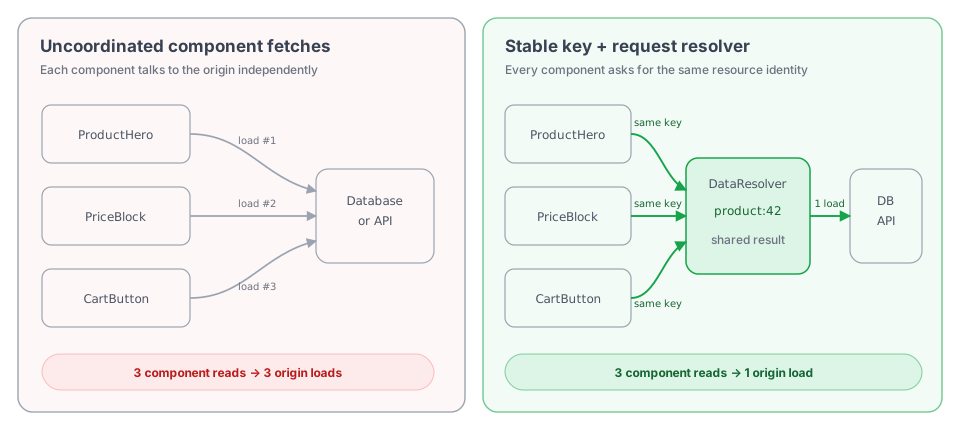
**Prefer keyed loading through `WebContext`.** It keeps data requirements beside the components that own them while preventing repeated database or API work. Loading in the handler remains useful when one fetch has one clear owner and rendering cannot begin without it.
| Pattern | Use it when |
|---------|-------------|
| Keyed load through `WebContext` **(preferred)** | Data may be used by multiple components, should dedupe, or can stream independently. |
| Load in the Axum handler | One fetch has one clear owner and rendering cannot begin without it. |
The model draws from [Haxl's](https://simonmar.github.io/bib/papers/haxl-icfp14.pdf) request-scoped deduplication and [TanStack Query's](https://tanstack.com/query/latest/docs/framework/react/guides/query-keys) keyed browser cache. Proa uses explicit concurrency and does not automatically batch distinct keys.
## How It Works
`LoadKey` identifies a resource, `DataLoader` fetches it and owns cache policy, and `DataResolver` shares repeated same-key loads across every component in one render. Use `LoadKey::named` for string ids or `LoadKey::typed` for values that implement `Hash`; `LoadValue` can carry JSON, raw bytes, or a typed Rust value.
A later request loads the resource again unless the `DataLoader` adds cross-request caching with `StandardDataLoader` or a custom shared cache. `LoadHints` can direct cache policies supported by that loader. Components request values through `WebContext` from inside `WebRender`. See [Data caching](/docs/framework/caching).
## Continue The Data Into The Browser
Server and browser caching are separate layers with an explicit handoff. `LoadKey` and `DataResolver` coordinate work while producing the response. If an interactive island needs to keep observing that data, pass the loaded value to `rsjs::query_with_initial(...)`. RSJS serializes it once into the response's query seed table, then installs it in the page-scoped browser cache under a structural `QueryKey`.
| Phase | Identity and owner | What is shared |
|-------|--------------------|----------------|
| Server render | `LoadKey` through one request-scoped `DataResolver` | Origin work across server components |
| HTML handoff | `query_with_initial(...)` | The server result becomes the browser's initial query value |
| Hydrated page | `QueryKey` through the RSJS query cache | Cached data and one in-flight fetch across islands |
| Browser mutation | Mutation invalidation keys | Fresh data is refetched for every observer of the affected query |
Keep the same logical namespace and id on both sides—for example, `product` plus `sku_1`—but remember that `LoadKey` and `QueryKey` are different types with different lifetimes. Proa does not expose the server loader to the browser. The `query_with_initial(...)` call is the deliberate bridge.
```rust
use std::future::Future;
use proa_core::{
DataLoader, RenderOutcome, WebContext, WebRender, WriteError,
};
use crate::data::product::{product_key, Product};
pub struct ProductPrice;
#[rsjs::rsjs(component, client)]
impl WebRender for ProductPrice {
fn render(
self,
cx: &mut WebContext,
) -> RenderOutcome>> {
RenderOutcome::pending(async move {
let initial: Product = cx.load_json(product_key("sku_1")).await?;
let product: rsjs::Query = rsjs::query_with_initial(
rsjs::QueryKey::new(("product", "sku_1")),
initial,
rsjs::FetchRequest {
url: "/api/products/sku_1",
response: Some(rsjs::ResponseKind::Json),
..Default::default()
},
rsjs::QueryOptions {
stale_time_ms: 30_000,
refetch_on_focus: true,
..Default::default()
},
);
proa_macros::html! {
{product.data().title}
{product.data().price_cents}" cents"
}
.render(cx)
.resolve()
.await
})
}
}
```
```rust
use std::future::Future;
use proa_core::{
DataLoader, RenderOutcome, WebContext, WebRender, WriteError,
};
pub struct ProductEditor;
#[rsjs::rsjs(component, client)]
impl WebRender for ProductEditor {
fn render(
self,
cx: &mut WebContext,
) -> RenderOutcome>> {
RenderOutcome::pending(async move {
let restock = rsjs::mutation::(
// Identity of this mutation and its reactive state.
rsjs::QueryKey::new(("product", "sku_1", "restock")),
rsjs::FetchRequest {
url: "/api/products/sku_1/stock",
method: Some(rsjs::HttpMethod::Patch),
credentials: Some(rsjs::FetchCredentials::SameOrigin),
response: Some(rsjs::ResponseKind::Empty),
..Default::default()
},
// Query cache entries to refetch after a successful restock.
&[rsjs::QueryKey::new(("product", "sku_1"))],
);
proa_macros::html! {
}
.render(cx)
.resolve()
.await
})
}
}
```
The mutation key identifies the write operation; the invalidation list names the query keys whose cached data is stale after that write succeeds.
This gives the page several useful properties:
- **Useful HTML immediately.** The first paint contains real data and does not wait for a browser fetch or hydration.
- **No throwaway bootstrap request.** The value loaded for SSR seeds the query cache; the browser refetches according to staleness policy rather than starting from an empty cache.
- **Deduplication in both environments.** Server components share one origin load per `LoadKey`; hydrated islands share one cache entry and one in-flight browser request per `QueryKey`.
- **Local ownership without prop plumbing.** A component can declare the data it needs on the server and the freshness behavior it needs in the browser.
- **Built-in freshness tools.** Queries support staleness windows, retries, polling, focus refetching, manual refetching, and shared invalidation after mutations.
- **Private origins stay private.** The server loader can use a database or internal service directly, while browser refreshes go through an authenticated public HTTP endpoint.
- **JavaScript stays scoped.** Static consumers remain server-only; Proa includes the RSJS query runtime only when rendered browser work actually uses a query or mutation.
The browser endpoint must return the same serialized shape used for the initial value. Mutations should invalidate the structural query keys whose data they changed. See [Queries and mutations](/docs/rsjs/queries-mutations) for retries, polling, progress, streaming text, mutation state, and cache lifetime details.
## JSON, Bytes, And Typed Values
Choose the `WebContext` load helper that matches the value shape:
| Helper | Loader value | Use it for |
|--------|--------------|------------|
| `cx.load_json::(key)` | `LoadValue::bytes(...)` | JSON data that should deserialize into `T`. |
| `cx.load_bytes(key)` | `LoadValue::bytes(...)` | Raw bytes such as pre-rendered fragments or API payloads. |
| `cx.load_typed::(key)` | `LoadValue::typed(value)` | Already-materialized Rust values stored in a loader or cache. |
Typed values return `Arc`, so multiple components can share the same materialized value without cloning a large structure.
## Cache Hints
`LoadHints` carry advisory policy without changing the identity of the data:
```rust
use std::time::Duration;
use proa_core::{CacheHint, CacheMode, LoadHints, LoadKey};
let product = cx
.load_json_with::(
LoadKey::named("product", "sku_1"),
LoadHints::new().with_cache(
CacheHint::ttl(Duration::from_secs(30)).with_mode(CacheMode::Refresh),
),
)
.await?;
```
Your loader can honor the hints, ignore them, or map them onto its own cache rules. See [Data caching](/docs/framework/caching) for the full cache-boundary model.
## Cross-Request Cache
For a simple in-process cache, wrap an upstream loader with `StandardDataLoader`:
```rust
use std::sync::Arc;
use std::time::Duration;
use proa_core::StandardDataLoader;
let upstream = AppLoader {};
let cached = Arc::new(StandardDataLoader::new(upstream, Duration::from_secs(30)));
```
`StandardDataLoader` caches by `LoadKey`, applies the request TTL hint when present, and supports manual invalidation with `invalidate(&key)` or `clear()`.
Use a process-local cache only when that matches your deployment model. For horizontally scaled apps, put shared cache policy in Redis, your database, your CDN, or the origin service. See [Data caching](/docs/framework/caching) for loader invalidation and [Page caching](/docs/framework/page-caching) for HTTP header patterns.
## Streaming Slow Sections
Use `RouteResponse::ssr_stream_with_loader` and `Suspense` when a page has a fast shell plus independent slow sections:
```rust
use proa_macros::{html, html_sync};
use proa_stream::Suspense;
pub async fn product_handler() -> impl axum::response::IntoResponse {
let loader = DataResolver::request_scope(Arc::new(AppLoader {}));
RouteResponse::ssr_stream_with_loader(
html! {
"Product"
{Suspense::new(
Recommendations { product_id: "sku_1" },
html_sync! { "Loading recommendations" },
)}
},
loader,
)
}
```
The fallback renders into the shell immediately. The child renders when its future completes. Streaming responses default to out-of-order chunked rendering.
Out-of-order boundaries can opt into scheduling metadata:
```rust
use std::time::Duration;
use proa_core::Priority;
let recommendations = Suspense {
child: Recommendations { product_id: "sku_1" },
fallback: html_sync! { "Recommendations unavailable" },
priority: Priority::Optional,
timeout: Some(Duration::from_millis(750)),
};
```
All boundary futures start concurrently. Priority is a deterministic tie-break when multiple boundaries are ready in the same driver turn: `Critical`, then `Optional`, then `Defer`, with boundary id breaking equal-priority ties. It does not delay lower-priority work.
The timeout starts when the driver admits the boundary after rendering the shell. If it expires, Proa cancels that future, emits `` for observability, preserves the shell fallback, and continues closing the response. The default framework adapter uses Tokio time. Runtime-independent hosts can drive `proa_stream::driver::out_of_order::OutOfOrderBoundaryDriver::next_deadline()` and `expire(now)` with their own clock; the clockless convenience adapter expires configured timeouts at admission rather than silently allowing an unbounded wait.
Buffered/static HTML, in-order HTML, and Markdown preserve source order and intentionally ignore both options. Cancelling an in-order child after it flushes could otherwise leave partial markup on the wire.
## Streaming Markdown Output
`Suspense` also works in Markdown render trees. Use this when a route or adapter should return generated `text/markdown` for agents, CLI clients, feeds, or high-density text views.
The low-level driver lives in `proa_stream`:
```rust
use std::{rc::Rc, sync::Arc};
use proa_core::{DataLoader, MdRender, StreamChunkFlusher, WriteError};
use proa_stream::render_md_in_order_to_flusher_with_loader;
pub async fn render_markdown>(
page: R,
loader: Arc,
flusher: Rc,
) -> Result<(), WriteError> {
render_md_in_order_to_flusher_with_loader(page, loader, flusher).await
}
```
The driver renders the root through `WebContext` in in-order mode with the supplied request-scoped loader, flushes parent Markdown before each streamed `Suspense` boundary, renders the child into the same buffer, then continues the document in order. Markdown-local state such as blank-line tracking is carried across the child boundary so streamed output matches buffered output.
Markdown `Suspense` boundaries preserve document order. The fallback is an HTML shell concern and is not emitted by the Markdown stream driver.
## Preload Known Keys
If you already know which keys a streamed route will need, start them before the component tree reaches each boundary.
On the typed path, wrap the loader explicitly:
```rust
use std::sync::Arc;
use proa_core::LoadKey;
use proa_stream::{DataResolver, PreparedLoader};
let app_loader = Arc::new(AppLoader {});
let resolver = DataResolver::request_scope(app_loader);
let loader = Arc::new(PreparedLoader::new_typed(
resolver,
[
LoadKey::named("product", "sku_1"),
LoadKey::named("recommendations", "sku_1"),
],
));
RouteResponse::ssr_stream_with_loader(ProductPage { id: "sku_1" }, loader)
```
On the dyn path, use the response helper:
```rust
RouteResponse::ssr_stream_with_loader_dyn(ProductPage { id: "sku_1" }, loader)
.with_preload_keys([LoadKey::named("product", "sku_1")])
```
Use `with_preload_requests(...)` when a preload needs cache hints.
## Pipeline CPU-Bound Work
`DataLoader` can coordinate expensive computation as well as I/O. If independent components need cryptographic verification, compression, image processing, or similar CPU-heavy results, route that work through a bounded application pipeline instead of running it on Tokio's async worker threads.
The complete pipeline spans five files. Use the tabs to follow a verification request from the component, through `DataLoader`, into the bounded CPU worker pipeline:
```rust
use std::sync::Arc;
use tokio::sync::{mpsc, oneshot};
use tokio::task::JoinSet;
#[derive(Debug)]
pub struct Verification {
pub valid: bool,
}
type CryptoResult = Result;
type CryptoFn = dyn Fn(Vec) -> CryptoResult + Send + Sync;
struct CryptoJob {
input: Vec,
reply: oneshot::Sender,
}
#[derive(Clone)]
pub struct CryptoPipeline {
tx: mpsc::Sender,
}
impl CryptoPipeline {
pub fn start(parallelism: usize, work: F) -> Self
where
F: Fn(Vec) -> CryptoResult + Send + Sync + 'static,
{
assert!(parallelism > 0);
let (tx, mut rx) = mpsc::channel::(parallelism * 2);
let work: Arc = Arc::new(work);
tokio::spawn(async move {
let mut running = JoinSet::new();
loop {
tokio::select! {
Some(job) = rx.recv(), if running.len() < parallelism => {
let work = Arc::clone(&work);
running.spawn_blocking(move || {
let result = work(job.input);
let _ = job.reply.send(result);
});
}
Some(_) = running.join_next(), if !running.is_empty() => {}
else => break,
}
}
while running.join_next().await.is_some() {}
});
Self { tx }
}
pub async fn run(&self, input: Vec) -> CryptoResult {
let (reply, result) = oneshot::channel();
self.tx
.send(CryptoJob { input, reply })
.await
.map_err(|_| "crypto pipeline stopped".to_owned())?;
result
.await
.map_err(|_| "crypto worker stopped".to_owned())?
}
}
```
```rust
use std::collections::HashMap;
use std::future::Future;
use std::sync::Arc;
use proa_core::{DataLoader, LoadError, LoadKey, LoadRequest, LoadValue};
use super::crypto_pipeline::CryptoPipeline;
pub fn verification_key(document_id: &str) -> LoadKey {
LoadKey::named("verification", document_id)
}
#[derive(Clone)]
pub struct AppLoader {
documents: Arc>>,
crypto: CryptoPipeline,
}
impl AppLoader {
pub fn new(documents: HashMap>, crypto: CryptoPipeline) -> Self {
Self {
documents: Arc::new(documents),
crypto,
}
}
}
impl DataLoader for AppLoader {
fn load(
&self,
request: &LoadRequest,
) -> impl Future
```rust
use std::future::Future;
use std::sync::Arc;
use proa_core::{DataLoader, RenderOutcome, WebContext, WebRender, WriteError};
use proa_macros::html;
use crate::data::crypto_pipeline::Verification;
use crate::data::loader::verification_key;
pub struct VerificationPanel {
pub document_id: String,
}
impl WebRender for VerificationPanel {
fn render(
self,
cx: &mut WebContext,
) -> RenderOutcome>> {
RenderOutcome::pending(async move {
let result: Arc =
cx.load_typed(verification_key(&self.document_id)).await?;
html! {
{if result.valid { "Valid signature" } else { "Invalid signature" }}
}
.render(cx)
.resolve()
.await
})
}
}
```
```rust
use std::sync::Arc;
use axum::extract::{Path, State};
use axum::response::IntoResponse;
use proa_framework_axum::RouteResponse;
use proa_stream::DataResolver;
use crate::components::verification_panel::VerificationPanel;
use crate::data::loader::AppLoader;
pub async fn document(
Path(id): Path,
State(app_loader): State>,
) -> impl IntoResponse {
let loader = DataResolver::request_scope(app_loader);
RouteResponse::ssr_async_with_loader(
VerificationPanel { document_id: id },
loader,
)
}
```
```rust
use std::collections::HashMap;
use std::sync::Arc;
use axum::routing::get;
use axum::Router;
use crate::data::crypto_pipeline::{CryptoPipeline, Verification};
use crate::data::loader::AppLoader;
use crate::routes::documents::document;
pub fn router(documents: HashMap>) -> Router {
let parallelism =
std::thread::available_parallelism().map_or(1, |threads| threads.get());
let crypto = CryptoPipeline::start(parallelism, verify_signature);
let loader = Arc::new(AppLoader::new(documents, crypto));
Router::new()
.route("/documents/:id", get(document))
.with_state(loader)
}
fn verify_signature(input: Vec) -> Result {
// Replace with the CPU-bound cryptography operation.
Ok(Verification {
valid: !input.is_empty(),
})
}
```
`src/app.rs` creates the pipeline once, while `src/routes/documents.rs` creates a fresh request-local `DataResolver` for each response. `DataResolver` deduplicates identical verification keys within that render; the shared pipeline controls concurrency across distinct jobs and requests. Replace the in-memory document map and `verify_signature` body with the application's storage and cryptography implementation.
Start known jobs with `PreparedLoader`, or place independent consumers in separate `Suspense` boundaries, so computation overlaps with other data loading and rendering instead of beginning only when the page must await its result.
Moving one indivisible calculation to another thread keeps the async runtime responsive, but does not make that calculation finish sooner. To reduce its own latency, split it into independent jobs or use a crypto implementation or CPU pool that parallelizes internally. Tokio recommends `spawn_blocking` for bounded blocking work and a specialized executor such as Rayon for substantial CPU-bound computation. Blocking jobs cannot be aborted after they start, so reject expired work before admission and keep the queue bounded. See [Tokio's CPU-bound task guidance](https://docs.rs/tokio/latest/tokio/task/fn.spawn_blocking.html).
---
# Docs: Databases
URL: /docs/framework/databases
Description: Connect SQLx, Diesel, or Toasty to a Proa DataLoader and render typed rows as components.
---
title: Databases
description: Connect SQLx, Diesel, or Toasty to a Proa DataLoader and render typed rows as components.
---
Proa is database and ORM agnostic. The framework crates ship no driver, no query builder, and no opinion about your data layer. The CLI offers a starting point you can keep or replace: `proa add database` wires SQLite through SQLx and `proa db` runs migrations.
`DataLoader` is the seam. It is a trait you implement, not a driver Proa ships, and its one required method returns a future, so anything you can await composes behind one key: a pool checkout, an ORM query, an HTTP call, a cache read, or all four.
This page connects [SQLx](https://github.com/launchbadge/sqlx), [Diesel](https://diesel.rs), and [Toasty](https://github.com/tokio-rs/toasty) to that trait. Everything above the loader is the same in all three, which is the point; only the module that defines `Product` differs (`src/data/loader.rs` for SQLx, `src/data/schema.rs` for Diesel, `src/data/model.rs` for Toasty), so adjust that one import. Installing and configuring each library is its own documentation; this page starts once you have a pool.
## The part that does not change
A component asks for what it needs by key. It never learns which library answers:
```rust filename="src/components/product_page.rs"
use std::future::Future;
use std::sync::Arc;
use proa_core::{DataLoader, RenderOutcome, WebContext, WebRender, WriteError};
use proa_macros::{html, text};
use crate::data::loader::{product_key, Product};
pub struct ProductPage {
pub id: i64,
}
impl WebRender for ProductPage {
fn render(
self,
cx: &mut WebContext,
) -> RenderOutcome>> {
RenderOutcome::pending(async move {
let product: Arc = cx.load_typed(product_key(self.id)).await?;
html! {
}
.render(cx)
.resolve()
.await
})
}
}
```
`load_typed` pairs with `LoadValue::typed` in the loader, so a database row moves from the query to the component as itself. Nothing is serialized to JSON on the way.
Two details decide whether a loader can answer a key at all:
- **`LoadKey::named("product", id)` renders as `product:42`**, which a loader can parse. `LoadKey::typed` hashes its input into `product#1e9f73…`, so use the named form whenever the loader needs the id back.
- **Request-local dedupe is keyed on that string.** Two components asking for `product:42` in one request produce one query.
Application-wide handles are shared the same way regardless of library. `FrameworkBuilder` is intentionally not generic over an application state type, so the loader goes through the response:
```rust filename="src/app.rs"
use std::sync::Arc;
use axum::{extract::Extension, routing::get};
use proa_framework_axum::{router_from_spec, FrameworkBuilder, Route};
use crate::{data::loader::AppLoader, db::connect_database};
let db = connect_database().await?;
let loader = Arc::new(AppLoader { db });
let (router, metadata) = router_from_spec(vec![
Route::page("/products/:id", "Product", get(product)),
]);
let app = FrameworkBuilder::new(manifest)
.with_dynamic_routes_and_metadata(router, metadata)
.build()
.layer(Extension(loader));
```
See [Route handlers](/docs/framework/route-handlers#sharing-application-state) for the broader state pattern, and [Data loading and streaming](/docs/framework/data-loading) for cache hints, dedupe, and streaming boundaries.
Everything below differs only in how the pool is built and what the loader runs.
## SQLx
SQLx is an asynchronous SQL toolkit rather than an ORM: connection pooling, migrations, typed row decoding, and optional compile-time query checking for SQLite, PostgreSQL, and MySQL. You write SQL.
```rust
use sqlx::{migrate::Migrator, sqlite::SqlitePoolOptions, SqlitePool};
static MIGRATOR: Migrator = sqlx::migrate!();
pub async fn connect_database() -> anyhow::Result {
let database_url = std::env::var("DATABASE_URL")?;
let db = SqlitePoolOptions::new()
.max_connections(10)
.connect(&database_url)
.await?;
MIGRATOR.run(&db).await?;
Ok(db)
}
```
```rust
use std::future::Future;
use proa_core::{DataLoader, LoadError, LoadKey, LoadRequest, LoadValue};
use sqlx::{FromRow, SqlitePool};
#[derive(Debug, FromRow)]
pub struct Product {
pub name: String,
pub price_cents: i64,
}
pub fn product_key(id: i64) -> LoadKey {
LoadKey::named("product", id.to_string())
}
pub struct AppLoader {
pub db: SqlitePool,
}
impl DataLoader for AppLoader {
fn load(
&self,
request: &LoadRequest,
) -> impl Future
```rust
use std::sync::Arc;
use axum::extract::{Extension, Path};
use axum::response::IntoResponse;
use proa_framework_axum::RouteResponse;
use proa_stream::DataResolver;
use crate::data::loader::AppLoader;
pub async fn product(
Extension(loader): Extension>,
Path(id): Path,
) -> impl IntoResponse {
let loader = DataResolver::request_scope(loader);
RouteResponse::ssr_async_with_loader(ProductPage { id }, loader)
}
```
```rust
use sqlx::SqlitePool;
pub async fn update_price(db: &SqlitePool, id: i64, price_cents: i64) -> sqlx::Result<()> {
let mut transaction = db.begin().await?;
sqlx::query("UPDATE products SET price_cents = ? WHERE id = ?")
.bind(price_cents)
.bind(id)
.execute(&mut *transaction)
.await?;
transaction.commit().await?;
Ok(())
}
```
**`src/db.rs`** — A SQLx pool is cheap to clone and every clone points at the same shared pool, so the loader holds one by value. Running migrations at startup suits a single instance; in a horizontally scaled deployment run them once as a release command instead of having every replica race.
**`src/data/loader.rs`** — `.bind(...)` sends the id as a query parameter rather than interpolating it into the SQL. `fetch_optional` keeps a missing row distinct from a database failure.
**`src/routes/products.rs`** — The handler wraps the shared loader in a request-scoped `DataResolver`, hands it to the response, and returns. It runs no query itself: the component asks for what it needs while rendering, and two components asking for the same key share one query because the resolver deduplicates within the request. Passing the bare `Arc` also works, but then each component that asks runs its own query.
**`src/routes/update_price.rs`** — Writes own their transaction and commit before a response is constructed.
## Diesel
Diesel is a query builder and ORM with a typed schema, so a mismatch between schema and query is a compile error rather than a runtime one. Diesel itself is synchronous; [`diesel-async`](https://github.com/weiznich/diesel_async) supplies async connections and pooling for PostgreSQL and MySQL.
```rust
use diesel_async::{
pooled_connection::{bb8, AsyncDieselConnectionManager},
AsyncPgConnection,
};
pub type Pool = bb8::Pool;
pub async fn connect_database() -> anyhow::Result {
let database_url = std::env::var("DATABASE_URL")?;
let config = AsyncDieselConnectionManager::::new(database_url);
Ok(bb8::Pool::builder().build(config).await?)
}
```
```rust
use diesel::prelude::*;
diesel::table! {
products (id) {
id -> BigInt,
name -> Text,
price_cents -> BigInt,
}
}
#[derive(Debug, HasQuery)]
pub struct Product {
pub name: String,
pub price_cents: i64,
}
```
```rust
use std::future::Future;
use diesel::prelude::*;
use diesel_async::RunQueryDsl;
use proa_core::{DataLoader, LoadError, LoadKey, LoadRequest, LoadValue};
use crate::data::schema::{products, Product};
use crate::db::Pool;
pub fn product_key(id: i64) -> LoadKey {
LoadKey::named("product", id.to_string())
}
pub struct AppLoader {
pub db: Pool,
}
impl DataLoader for AppLoader {
fn load(
&self,
request: &LoadRequest,
) -> impl Future
```rust
use diesel::prelude::*;
use diesel::result::Error;
use diesel_async::{AsyncConnection, RunQueryDsl};
use crate::data::schema::products;
use crate::db::Pool;
pub async fn update_price(db: &Pool, id: i64, price_cents: i64) -> anyhow::Result<()> {
let mut conn = db.get().await?;
conn.transaction::<_, Error, _>(async |conn| {
diesel::update(products::table.filter(products::id.eq(id)))
.set(products::price_cents.eq(price_cents))
.execute(conn)
.await?;
Ok(())
})
.await?;
Ok(())
}
```
**`src/db.rs`** — `diesel-async` re-exports its pool backends, so `bb8` comes from `diesel_async::pooled_connection::bb8` rather than a direct dependency.
**`src/data/schema.rs`** — `diesel_cli` normally generates this from your migrations; it is inline here so the example stands alone. `#[derive(HasQuery)]` gives you `Product::query()` and proves the result can be loaded into this type.
**`src/data/loader.rs`** — `.filter(products::id.eq(id))` is a bound parameter, not string interpolation. `.optional()` comes from `OptionalExtension` in `diesel::prelude` and turns a "no rows" error into `Ok(None)`, which keeps a missing row distinct from a failed query.
**`src/routes/update_price.rs`** — `diesel-async` takes an async closure and commits when it returns `Ok`.
## Toasty
[Toasty](https://tokio.rs/blog/2026-04-03-toasty-released) is the Tokio project's async ORM. You define models as plain Rust structs and it infers the schema, generating the query, create, and update builders so you write no SQL. It targets SQLite, PostgreSQL, MySQL, Turso, and DynamoDB from one model definition.
Toasty is pre-1.0 and moving quickly. Pin a version, and expect API changes between minor releases in a way you would not expect from SQLx or Diesel.
```rust
#[derive(Debug, toasty::Model)]
pub struct Product {
#[key]
#[auto]
pub id: uuid::Uuid,
pub name: String,
pub price_cents: i64,
}
```
```rust
pub async fn connect_database() -> toasty::Result {
let url = std::env::var("TOASTY_CONNECTION_URL")
.unwrap_or_else(|_| "sqlite::memory:".to_string());
let db = toasty::Db::builder()
.models(toasty::models!(crate::*))
.connect(&url)
.await?;
Ok(db)
}
```
```rust
use std::future::Future;
use proa_core::{DataLoader, LoadError, LoadKey, LoadRequest, LoadValue};
use crate::data::model::Product;
pub fn product_key(id: uuid::Uuid) -> LoadKey {
LoadKey::named("product", id.to_string())
}
pub struct AppLoader {
pub db: toasty::Db,
}
impl DataLoader for AppLoader {
fn load(
&self,
request: &LoadRequest,
) -> impl Future
```rust
use crate::data::model::Product;
pub async fn update_price(
db: &toasty::Db,
id: uuid::Uuid,
new_price: i64,
) -> toasty::Result<()> {
let mut tx = db.transaction().await?;
let mut product = Product::get_by_id(&mut tx, &id).await?;
toasty::update!(product { price_cents: new_price }).exec(&mut tx).await?;
tx.commit().await?;
Ok(())
}
```
**`src/data/model.rs`** — `#[key]` marks the primary key and `#[auto]` fills it on insert, which for a `Uuid` means a time-ordered UUID v7. The attributes drive the generated API: `#[unique]` on a field is what makes `Product::get_by_` exist at all.
**`src/db.rs`** — `toasty::models!` discovers every `#[derive(Model)]` in the crate, so models are not listed by hand. A fresh database has no tables; `db.push_schema().await?` creates them straight from the models, which is the quick path for demos and tests. Use migrations for anything with data you care about.
**`src/data/loader.rs`** — `filter_by_*` builds a lazy query and the terminal decides the result shape: `.first().exec(&mut db)` yields `Option`, `.exec(&mut db)` on the unfiltered query yields `Vec`, and `.get(&mut db)` expects exactly one row and errors otherwise.
**`src/routes/update_price.rs`** — A Toasty transaction is a value you pass where you would pass the `Db`. Dropping it rolls back, so an early return needs no explicit rollback.
## Choosing
| | SQLx | Diesel | Toasty |
|---|---|---|---|
| You write | SQL | Typed query builder | Model methods |
| Query checking | Optional, via `query!` and offline metadata | Always, by the Rust type system | Generated from the model |
| Async | Native | Via `diesel-async` | Native |
| Backends | SQLite, PostgreSQL, MySQL | SQLite, PostgreSQL, MySQL | SQLite, PostgreSQL, MySQL, Turso, DynamoDB |
| Maturity | Stable, widely deployed | Stable, widely deployed | Pre-1.0, released April 2026 |
None of this changes anything on the Proa side. Pick on the merits of the data layer.
## Do not hold a transaction across a render
This applies to every library above. Keep a transaction in the handler that owns the mutation, and commit it before constructing the response. Do not place a live transaction inside a component or in shared application state. Its lifetime should be limited to one request operation, and no HTML should be emitted until the write either commits or rolls back.
## When to use `DataLoader`
Do not wrap your database library in a `DataLoader` solely because Proa has one. A handler query followed by a sync component is the shortest and most explicit path for a page that needs one result.
Use a loader when independent components initiate reads, several components may request the same key, or a slow section should participate in `Suspense`. Because `DataLoader::load` is just an async method you write, the loader can own whatever handle your library uses: a cloned `SqlitePool` or `PgPool`, a `bb8::Pool`, a `toasty::Db`, or several of them at once behind different key namespaces. Return `LoadValue::typed(record)` for a Rust value or `LoadValue::bytes(..)` for serialized JSON.
See [Data loading and streaming](/docs/framework/data-loading) for that pattern, and [Caching](/docs/framework/caching) before caching database results across requests.
## Next steps
- [Data loading and streaming](/docs/framework/data-loading)
- Implement a `DataLoader`, key requests, and stream slow sections with `Suspense`.
- [Route handlers](/docs/framework/route-handlers)
- Build JSON, form, and webhook endpoints, and share application state.
- [Forms and actions](/docs/guides/forms-actions)
- Accept a write, validate it on the server, and re-render.
- [Caching](/docs/framework/caching)
- Decide what is safe to cache across requests.
---
# Docs: Data caching
URL: /docs/framework/caching
Description: Deduplicate loads, cache data across requests, and invalidate render dependencies.
---
title: Data caching
description: Deduplicate loads, cache data across requests, and invalidate render dependencies.
---
Proa keeps data cache policy explicit. The framework does not silently cache data fetches for you. Choose the boundary that matches the work:
| Resource | Cache at |
|----------|----------|
| Request-local data | `DataResolver` |
| Cross-request data | application loader, `StandardDataLoader`, Redis, database, or origin service |
For complete HTML responses, HTTP cache headers, ETags, and Cloudflare setup, see [Page caching](/docs/framework/page-caching).
## Cache Boundaries
Request-local dedupe prevents components in one render from loading the same key twice. Cross-request caching reduces origin reads across users or requests. Prefer the narrowest cache that removes real work without sharing user-specific data.
Data caching reduces work when a request reaches the application. A fresh CDN page-cache hit skips the application entirely. Each cache needs its own freshness and invalidation policy.
## Request-Local Dedupe
Wrap your loader with `DataResolver` when multiple components can ask for the same key during one render:
```rust
use std::sync::Arc;
use proa_stream::DataResolver;
pub async fn product_handler() -> impl axum::response::IntoResponse {
let app_loader = Arc::new(AppLoader::new());
let loader = DataResolver::request_scope(app_loader);
RouteResponse::ssr_async_with_loader(ProductPage { id: "sku_1" }, loader)
}
```
This is a per-render optimization. It does not persist values across requests.
## Cross-Request Data Cache
For a process-local cache, wrap an upstream loader with `StandardDataLoader`:
```rust
use std::sync::Arc;
use std::time::Duration;
use proa_core::StandardDataLoader;
let cached_loader = Arc::new(StandardDataLoader::new(
AppLoader::new(),
Duration::from_secs(30),
));
```
`StandardDataLoader` stores `LoadValue` by `LoadKey`, expires entries by TTL, and exposes manual invalidation:
```rust
use proa_core::LoadKey;
cached_loader.invalidate(&LoadKey::named("product", "sku_1"));
cached_loader.clear();
```
Use a process-local cache only when each instance can safely have its own copy. For horizontally scaled apps, put shared cache state in Redis, your database, your CDN, or the upstream service.
## Load Hints
`LoadHints` carry cache policy without changing the identity of the data:
```rust
use std::time::Duration;
use proa_core::{CacheHint, CacheMode, LoadHints, LoadKey};
let product = cx
.load_json_with::(
LoadKey::named("product", "sku_1"),
LoadHints::new().with_cache(
CacheHint::ttl(Duration::from_secs(60)).with_mode(CacheMode::Refresh),
),
)
.await?;
```
The built-in cache modes are:
| Mode | Meaning |
|------|---------|
| `UseLoaderDefault` | Let the loader apply its normal policy. |
| `Bypass` | Skip the loader-managed cache and fetch from origin. |
| `Refresh` | Fetch from origin and update the cache entry. |
| `OnlyIfCached` | Return cached data or fail with `LoadError::CacheMiss`. |
Custom loaders may honor hints, ignore them, or map them onto their own cache system. Keep `LoadKey` stable; put freshness policy in `LoadHints`.
## Invalidation
Choose invalidation at the same boundary as the cache:
| Cache | Invalidate by |
|-------|---------------|
| `DataResolver` | end of request |
| `StandardDataLoader` | TTL, `invalidate(&key)`, or `clear()` |
| Redis/database cache | app-specific key, tag, or write transaction |
When data changes through a form or API mutation, invalidate the data cache before redirecting or returning the success response.
If that data appears in cached HTML, invalidate the affected CDN pages too. Clearing a loader cache does not remove an already rendered edge response. See [Page caching](/docs/framework/page-caching#running-deployment-and-invalidation).
```rust
pub async fn update_product(Form(form): Form) -> Redirect {
save_product(&form).await;
cached_loader.invalidate(&LoadKey::named("product", form.id.as_str()));
Redirect::to("/products")
}
```
## Cache Trace
`WebContext` exposes `cache_trace_mut()` for render-time dependency recording:
```rust
cx.cache_trace_mut().set_ttl(Duration::from_secs(60));
cx.cache_trace_mut().depend_tag("product:sku_1");
cx.cache_trace_mut().depend_path("/products/sku_1");
```
Use this when your application wants to collect dependencies during render and map them to its own invalidation system. Proa records the trace; your app decides how to consume it. Recording a TTL or tag here does not automatically emit CDN headers or call Cloudflare's purge API.
## Production Checklist
- Wrap loaders with `DataResolver` when a render can load the same key repeatedly.
- Use `StandardDataLoader` only when process-local cache state is acceptable.
- Put cross-instance cache state in shared infrastructure.
- Include the relevant user or tenant identity when caching private data across requests.
- Invalidate on mutation before redirecting.
- Invalidate any affected CDN pages separately.
See [Data loading and streaming](/docs/framework/data-loading), [Route handlers](/docs/framework/route-handlers), and [Page caching](/docs/framework/page-caching).
---
# Docs: Forms and actions
URL: /docs/guides/forms-actions
Description: Build and validate HTML forms, handle submissions with Axum, and attach typed actions.
---
title: Forms and actions
description: Build and validate HTML forms, handle submissions with Axum, and attach typed actions.
keywords: [Action, form, CSRF token]
---
Proa keeps server mutations explicit: the browser submits a native HTML form, and an Axum handler validates and writes the data. This page covers [rendering the form](#rendering-a-native-form), [validation with Wellformed](#validating-with-wellformed), [typed client actions](#adding-typed-client-actions), and [choosing a boundary](#choosing-a-boundary).
## Rendering a native form
Use real form controls whenever a browser submit is enough:
```rust filename="src/pages/contact.rs"
use proa_macros::html_sync;
html_sync! {
}
```
This renders useful HTML before any JavaScript loads. The browser owns focus, keyboard submission, autofill, and constraint validation. Those constraints improve the experience, but the server must still validate every submission.
### Form controls
Start with native controls:
| Component | Native element |
|-----------|----------------|
| Text input | ``, ``, `` |
| Text area | `